Bắt đầu di chuyển từ VirtueMart sang WooCommerce ngay hôm nay!
Chuyển cửa hàng từ VirtueMart sang WooCommerce bằng quy trình an toàn, có hướng dẫn và phù hợp với doanh nghiệp của bạn.


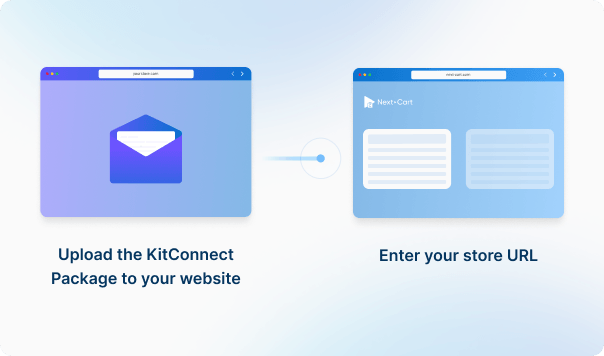
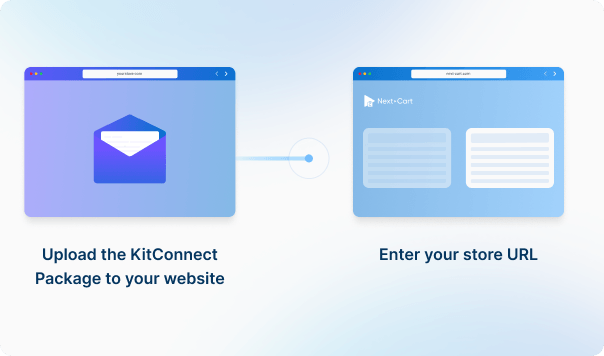




Tải gói KitConnect lên website của cửa hàng WooCommerce mà bạn muốn chuyển dữ liệu đến, sau đó nhập URL của cửa hàng đó để thiết lập kết nối. Điều này cho phép hệ thống truy cập an toàn vào dữ liệu của cửa hàng đó để thực hiện di chuyển dữ liệu.




 VirtueMart
 WooCommerceVirtueMartWooCommerce

Bốn loại dữ liệu này được dùng để ước tính chi phí. Các dữ liệu được hỗ trợ khác, bao gồm danh mục, mã giảm giá và đánh giá, vẫn được di chuyển mà không tính thêm phí.
Bạn có thể tăng hạn mức dữ liệu của gói, nâng cấp dịch vụ hoặc bổ sung công việc tùy chỉnh khi giấy phép còn hiệu lực.
Bạn chỉ thanh toán phần chênh lệch; ngày hết hạn giấy phép không thay đổi. Công việc tùy chỉnh được đánh giá và báo giá riêng.
Tìm hiểu về nâng cấp (Mở trong thẻ mới)Quy trình tích hợp sẵn nhận diện cấu trúc sản phẩm con thông thường và có nhánh dự phòng riêng cho cấu trúc plugin stockable. Những cấu trúc sản phẩm con tùy chỉnh khác cần được kiểm tra bằng sản phẩm mẫu trước khi di chuyển toàn bộ. Sản phẩm đã xuất hiện không chứng minh mọi tổ hợp có thể mua đã được tạo lại.
Quy trình nhập WooCommerce mặc định dùng taxonomy product_brand cho dữ liệu nhà sản xuất và thương hiệu được cung cấp. Hệ thống tìm hoặc tạo thương hiệu tương ứng rồi gán cho sản phẩm. Hãy kiểm tra các thương hiệu sản phẩm tạo ra; quá trình này không tự ghi dữ liệu vào một taxonomy thương hiệu khác của plugin bên thứ ba.
Biến thể có sẵn ở nguồn trở thành biến thể WooCommerce mà không qua bước tạo tổ hợp từ tùy chọn. Khi nguồn chỉ có tùy chọn, kết nối mặc định tạo từng biến thể nếu cần thể hiện giá, tồn kho, ảnh hoặc SKU riêng của lựa chọn. Nếu không cần, hoặc có hơn 1.000 tổ hợp, công cụ dùng một biến thể chấp nhận mọi giá trị tùy chọn đã liệt kê. Cách dự phòng này dùng giá sản phẩm chính và không quản lý tồn kho độc lập cho từng tổ hợp.
Kết nối WPML và Polylang tạo tổ hợp theo cách khác: tối đa 3.000 và không tạo tổ hợp nào nếu vượt mức đó. Đây là quy tắc xử lý của Next-Cart, không phải giới hạn nền tảng WooCommerce. Hãy xác nhận lựa chọn, giá và cách phân bổ tồn kho trước khi chuyển danh mục chỉ có tùy chọn.
Next-Cart sao chép các ảnh được cung cấp vào WooCommerce và gán một ảnh cho mỗi biến thể có ảnh riêng. Công cụ không tự tạo một bộ nhiều ảnh riêng cho từng biến thể. Giữ file ảnh cũ truy cập được, rồi kiểm tra bộ ảnh sản phẩm và ảnh hiển thị khi chọn biến thể. Ảnh trong mô tả cần tùy chọn sao chép riêng nếu được hỗ trợ.
Giữ các file gốc và URL của chúng có thể truy cập được, đồng thời xác định nơi lưu trữ file sau khi di chuyển. Thông tin tải xuống trong sản phẩm không phải bản thân file hay quyền tải từ các đơn hàng trước đó. Xem FAQ của đúng cặp nguồn → WooCommerce để biết cách xử lý liên kết file, thiết lập tải xuống và quyền truy cập. Thử tải file bằng tài khoản khách hàng trước khi ngừng nơi lưu trữ file cũ.
Trong kết nối WooCommerce mặc định, các liên kết sản phẩm liên quan do nguồn cung cấp được gộp với liên kết sản phẩm bán thêm và lưu thành up-sells của WooCommerce. Cross-sells được ánh xạ riêng. Vì vậy, kết quả không tái tạo một hệ thống sản phẩm liên quan riêng như ở nguồn. Hãy đưa các sản phẩm được tham chiếu vào phạm vi di chuyển và kiểm tra những sản phẩm được chọn làm up-sells và cross-sells sau khi chuyển.
Kiểm tra riêng các trường người mua lựa chọn, thuộc tính mô tả và dữ liệu chỉ dành cho quản trị viên. Quy trình mặc định xử lý các loại cart attributes được nhận diện, có nhánh riêng cho giá trị Customs for All, nhưng bỏ qua cart fields chỉ dành cho quản trị và các loại tùy chọn không nhận diện. Cách hiển thị và hoạt động cuối cùng vẫn phụ thuộc đích.
Đơn hàng sử dụng ánh xạ khách hàng nguồn–đích để tìm tài khoản khách hàng ở đích. Nếu không có ánh xạ, quy trình nhập dùng customer ID 0 nên đơn hàng không liên kết với tài khoản đã đăng ký. Hãy đưa các khách hàng liên quan vào phạm vi và giữ các ánh xạ của họ. Kiểm tra lịch sử đơn hàng trong tài khoản riêng với thông tin thanh toán và giao hàng được lưu trên đơn.
Kiểm tra các tài khoản cần thiết đã được nhập: email hoặc tên đăng nhập đã tồn tại ở đích có thể khiến một tài khoản bị bỏ qua. Khả năng dùng mật khẩu cũ phụ thuộc vào nguồn và phiên bản. Một số cặp được hỗ trợ cần Customer Password Plugin; các cặp dựa trên WordPress có định dạng tương thích có thể dùng trực tiếp mã băm mật khẩu đã lưu. Thử đăng nhập, đặt lại mật khẩu và kiểm tra riêng lịch sử đơn hàng trong tài khoản. Chỉ có đơn hàng hoặc thông tin thanh toán được nhập chưa chứng minh khách đã đăng nhập được.
Khách hàng có thể giữ mật khẩu cũ nếu dữ liệu đăng nhập được lưu trong VirtueMart còn sử dụng được và Customer Password Plugin tương ứng hỗ trợ đúng phiên bản của hai nền tảng.
Email hoặc tên đăng nhập đã tồn tại ở đích có thể khiến tài khoản khách hàng bị bỏ qua. Kiểm tra tài khoản đã được nhập và thử đăng nhập riêng, không chỉ xem lịch sử đơn hàng. VirtueMart 1/3 sử dụng dữ liệu xác thực của người dùng Joomla liên kết; trình đọc phiên bản 3 loại trừ tài khoản quản trị. Cài đúng plugin và thử đăng nhập bằng tài khoản đã chuyển trước khi cho khách sử dụng. Tài khoản thiếu dữ liệu đăng nhập tương thích cần đặt lại mật khẩu hoặc kích hoạt lại.
Đơn hàng nhập vào được cấp ID nội bộ mới trong WordPress hoặc HPOS. Next-Cart cũng lưu số đơn ban đầu vào metadata số đơn hàng; nếu nguồn không có số đơn riêng thì dùng ID đơn hàng nguồn. Số được lưu này khác với ID nội bộ. Hãy kiểm tra cách plugin đánh số đơn, email và các tích hợp hiển thị hoặc sử dụng nó, thay vì mặc định ID cơ sở dữ liệu cũ được giữ nguyên.
Có, khi nguồn cung cấp giá trị SEO được nhận diện. Quy trình mặc định ghi tiêu đề SEO, mô tả SEO và từ khóa trọng tâm vào metadata mà cả Yoast SEO và Rank Math sử dụng, kể cả các luồng sản phẩm WPML và Polylang. Hãy cấu hình plugin định dùng và kiểm tra metadata ngoài cửa hàng; nhập trường không cài plugin, không tạo lại quy tắc mẫu và không bảo đảm thứ hạng tìm kiếm.
Trong kết nối cập nhật WooCommerce mặc định, số lượng áp dụng cho sản phẩm chính đã có liên kết nguồn–đích, không phải mọi biến thể. Chỉ chọn số lượng không cập nhật đầy đủ trạng thái còn hàng/hết hàng; cách cập nhật hiện tại còn yêu cầu chọn trường quản lý tồn kho để ghi những trạng thái đó.
Data Update là add-on trả phí, khác với nhập sản phẩm mới. Cần giữ liên kết của lần di chuyển trước và không xóa dữ liệu đích. Add-on không dựng lại tồn kho biến thể, các tổ hợp hoặc bộ ảnh sản phẩm. Hãy xác nhận trường đã chọn, rồi kiểm tra cả số lượng và khả năng đặt mua sau cập nhật. Cần kết nối nguồn tương thích và chọn đúng các trường cập nhật.
Các dịch vụ khả dụng tùy thuộc vào cặp nguồn–đích. Standard Migration cho phép bạn tự dùng công cụ và nhận hỗ trợ kỹ thuật. Với Managed Migration, kỹ thuật viên thực hiện việc di chuyển đã thống nhất. Custom Migration đáp ứng yêu cầu tùy chỉnh; bạn hoặc đội ngũ chúng tôi thực hiện di chuyển dữ liệu theo thỏa thuận. Các loại dữ liệu phải được cả hai kết nối hỗ trợ; chọn chuyên gia thực hiện không tự bổ sung khả năng chuyển dữ liệu chưa được hỗ trợ.
Nếu cặp nguồn–đích có demo tự chạy, bạn có thể thử miễn phí trước khi mua. Demo chuyển một mẫu nhỏ dữ liệu được hỗ trợ để bạn kiểm tra kết quả, không bao gồm add-ons và công việc tùy chỉnh. Với việc kiểm thử qua file, theo yêu cầu riêng hoặc có kỹ thuật viên hỗ trợ, hãy liên hệ trước để thống nhất phạm vi thử và chi phí áp dụng, nếu có.
Loại và số lượng dữ liệu được dùng để tính tổng Entity Points và xác định gói phù hợp. Chi phí còn phụ thuộc vào dịch vụ, add-ons và công việc tùy chỉnh bạn chọn. Dùng công cụ tính giá để xem chi phí ước tính; công việc tùy chỉnh được đánh giá và báo giá riêng.
Nếu di chuyển từ một cửa hàng đang hoạt động, cửa hàng thường vẫn có thể nhận đơn trong khi Next-Cart sao chép dữ liệu. Quá trình này không xóa hay thay đổi dữ liệu nguồn. Hãy lên kế hoạch riêng cho lần cập nhật cuối và việc chuyển sang cửa hàng mới để bao gồm đơn hàng mới cùng các thay đổi khác. Với di chuyển dữ liệu qua file, thay đổi sau lần xuất dữ liệu cần một bản xuất mới; file đã tải lên không phải kết nối trực tiếp với cửa hàng.
Có. Giấy phép cho phép chạy lại với cùng cửa hàng và cặp nguồn–đích trong 12 tháng kể từ ngày mua, trong hạn mức dữ liệu của gói. Tiếp tục lần di chuyển trước có thể thêm bản ghi mới phù hợp mà không nhập lại những bản ghi đã có liên kết nguồn–đích.
Thay đổi dữ liệu đã di chuyển là thao tác riêng: add-on trả phí Data Update có thể cập nhật các trường đã chọn khi nguồn, phiên bản đích và những trường đó được hỗ trợ. Cần giữ liên kết của lần di chuyển trước và không bật xóa dữ liệu đích. Đây không phải cơ chế tự cập nhật mọi trường hoặc đồng bộ liên tục.
Có. Khi giấy phép còn hiệu lực, bạn có thể tăng hạn mức dữ liệu của gói và nâng lên dịch vụ cao hơn nếu dịch vụ đó khả dụng cho cặp nguồn–đích. Bạn có thể nâng Standard Migration lên Managed Migration hoặc Custom Migration, hoặc nâng Managed Migration lên Custom Migration.
Nếu đã dùng Custom Migration, bạn vẫn có thể bổ sung công việc tùy chỉnh sau khi đánh giá và báo giá. Bạn chỉ thanh toán phần bổ sung; ngày hết hạn giấy phép không thay đổi.


Chuyển cửa hàng từ VirtueMart sang WooCommerce bằng quy trình an toàn, có hướng dẫn và phù hợp với doanh nghiệp của bạn.