Next-Cart

See Every Step Before You Move Your Store

From DIY to fully managed and enterprise-grade solutions, we’ve got the right service for every migration need.

Migration Workflow Overview at a Glance

A clear, visual walkthrough of how your migration progresses from start to finish.
Each step is outlined so you always know what happens next.
Step 1
Step 2
Step 3
Step 4
Connect Your Stores
Choose your Source Platform and Target Platform, then connect both stores using API, KitConnect, or supported files.
Test the credentials and connections before moving on, so avoidable access issues do not slow you down.

Connect Your Stores

The Complete Workflows by Service

See exactly who handles each task in Standard Migration, Managed Migration, and Custom Migration, from connection to go-live.
Standard Migration
1-Year of Use & Support
Managed Migration
1-Year of Use & Support
Custom Migration
Reach out for pricing and a custom deployment.
Standard Migration
icon 1
icon You
Connect Your Two Stores
icon Need help setting up the connection?
Get help connecting your stores
icon Next-Cart
icon Having connection issues?
Troubleshoot with a Next-Cart technician
icon Next-Cart
icon 2
icon You
Configure Data and Mappings
icon Not sure what data to migrate?
Choose entities and migration options
icon Next-Cart
icon Need help with mappings?
Review field mappings and configuration
icon Next-Cart
icon 3
icon You
Run Demo then Full Migration
icon Want to check the setup first?
Run a Demo Migration and review the sample
icon Next-Cart
icon Demo looks good?
Continue with the Full Migration
icon Next-Cart
icon 4
icon You
Review Results, Sync Recent Data
icon Migration completed?
Validate data on the Target Store
icon Next-Cart
icon Something needs adjusting?
Fix issues or run Re-migration if needed
icon Next-Cart
icon Ready for the final sync?
Run Recent Data Migration before go-live
icon Next-Cart
Managed Migration
icon 1
icon You
Submit Your Migration Request
icon What should you send us?
Share your Source and Target store details
icon Next-Cart
icon Have special requirements or a deadline?
Include your scope, access, and go-live needs
icon Next-Cart
icon 2
icon You
Let Next-Cart Connect Stores
icon What happens after your request?
Our technicians set up the store connections
icon Next-Cart
icon What if a connection fails?
We verify access and resolve connection issues
icon Next-Cart
icon 3
icon You
Configure, Run, Review Demo
icon Who configures the migration?
We set the scope, options, and mappings
icon Next-Cart
icon How is the setup checked?
We run the Demo and review the results
icon Next-Cart
icon 4
icon You
Run and Validate Full Migration
icon Ready for the full transfer?
We run and monitor the Full Migration
icon Next-Cart
icon What happens after it finishes?
We validate the migrated data and resolve issues
icon Next-Cart
icon 5
icon You
Sync Recent Data, Then Go-Live
icon New data added after the full run?
We run Recent Data Migration
icon Next-Cart
icon Ready to launch?
We complete final checks and support you through go-live
icon Next-Cart
Custom Migration
icon 1
icon You
Define Your Custom Requirements
icon What should you describe?
Share custom fields, extra data, and special rules
icon Next-Cart
icon How can we understand the expected result?
Provide examples and expected outputs
icon Next-Cart
icon 2
icon You
Connect Stores, Provide Access
icon What access is required?
Provide the connection details needed for your stores
icon Next-Cart
icon Is custom data stored elsewhere?
Share access to relevant apps, files, or data sources
icon Next-Cart
icon 3
icon You
Build and Validate Custom Job
icon What does Next-Cart build?
We implement the required custom migration logic
icon Next-Cart
icon How is it verified?
We test sample data and refine the Custom Job
icon Next-Cart
icon 4
icon You
Run and Validate Full Migration
icon Custom logic approved?
We run the Full Migration with the custom setup
icon Next-Cart
icon How are results checked?
We validate against your agreed requirements and resolve issues
icon Next-Cart
icon 5
icon You
Sync Recent Data, Then Go-Live
icon Need the latest source data?
Run Recent Data Migration before launch
icon Next-Cart
icon Ready to go live?
We perform final checks and support you through launch
icon Next-Cart
Scroll to explore steps
Try a Free Demo
icon
icon

End-to-End Migration Workflow

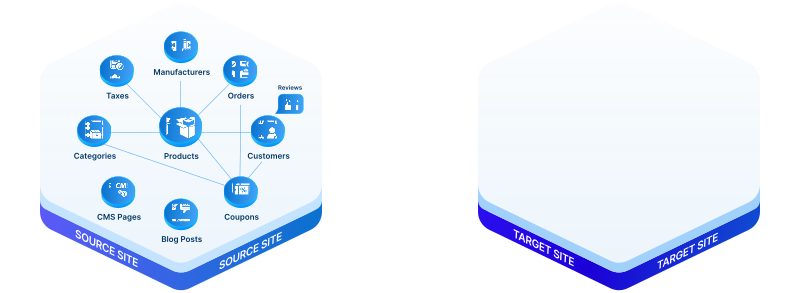
Next-Cart copies supported store data from the Source Platform to the Target Platform, preserving important relationships wherever the platform pair allows.
Taxes
Taxes
icon
Manufacturers
Manufacturers
icon
Product Categories
Product Categories
icon
Products
Products
icon
Customers
Customers
icon
Orders
Orders
icon
Reviews
Reviews
icon
Coupons
Coupons
icon
CMS Pages
CMS Pages
icon
Blog Posts
Blog Posts
Taxes
Taxes
Move supported historical tax data from products and orders. Tax rules for future sales still need to be configured on the Target Platform.
before
before
Ready to Move Your Store?
Start with a Free Demo to validate your connections and data structure before you commit to the Full Migration.
Start migration