Start Your nopCommerce to Shopify Migration Today!
Move your store from nopCommerce to Shopify with a secure, guided migration tailored to your business.


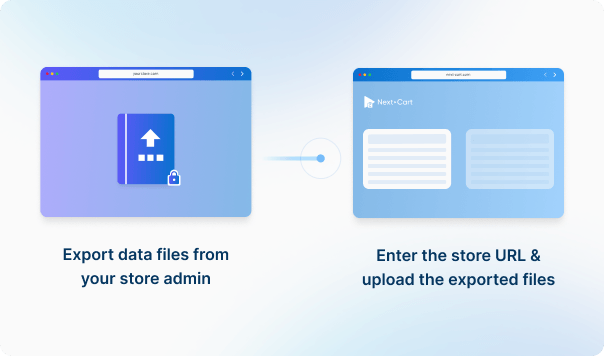




Enter the URL of the nopCommerce store you are migrating from and upload the required data files to establish the connection.
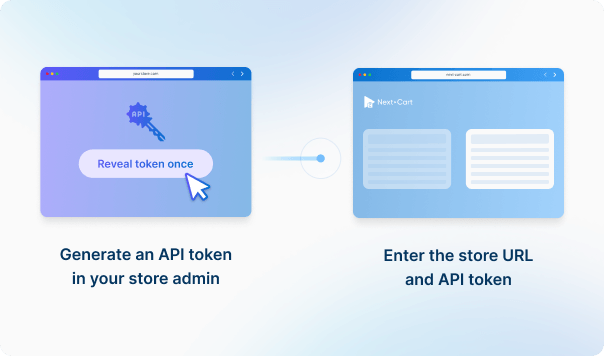
Generate an API access token in the admin of the Shopify store you are migrating to. Then enter that store’s URL and API credentials to connect. This enables secure data transfer into that Shopify store.




 nopCommerce
 ShopifynopCommerceShopify

These four data types are used to estimate the price. Other supported data, including categories, coupons, and reviews, is also migrated at no extra charge.
You can increase your plan’s data limit, upgrade your service, or add custom work while your license is valid.
You only pay the price difference, and your license expiry date stays the same. Custom work is reviewed and quoted separately.
Learn about upgrades (Opens in a new tab)Provide the XML export together with products.xlsx. XML supplies the main product data; the spreadsheet supplements it with image paths and some attributes. Keep product identifiers consistent across both files, retain the Picture1 to Picture3 columns, and make sure the referenced images are accessible.
Yes, for supported translated product fields supplied by the source and mapped to Shopify languages. Next-Cart skips the destination's default language, missing source translations and fields that Shopify does not expose for translation. Map the required languages and check the translated titles, descriptions and other supported fields; missing translations are not created automatically.
Treat collection membership and storefront navigation as separate parts of the result. Confirm how your source categories and subcategories will map to Shopify collections and menu links for your chosen migration path. Check the products assigned to each collection and test the menu in your theme. Do not assume that transferring category names recreates the old hierarchy or that a generated menu is already displayed on the storefront.
Not through the standard review output alone. Next-Cart prepares a review CSV linked to the migrated product handles; you must import it using a compatible review solution. Confirm the receiving app's required format first, and migrate the associated products before their reviews.
Existing source variants are transferred with their supported choices and variant details. If the source supplies separate options instead, Next-Cart can generate variant combinations, but this step creates none when there are more than 2,500 possible combinations.
The actual option and variant limits of your Shopify store also apply. Choices beyond the option limit can be omitted, combinations that no longer match those choices are removed, and excess variants are not imported. The 2,500 generation limit is therefore not a promised Shopify allowance. Check complex products before migration; text inputs, conditional choices and app-specific rules need a separate agreed setup.
Next-Cart sends the supplied product images to Shopify and links each variant to its supplied image. If Shopify rejects the images, a product may be created without them. Check the gallery, variant pictures and image warnings even when the product import succeeds. A separate gallery for each variant or custom image-switching behavior is not recreated. Images inside descriptions need the separate copying option, where supported.
No. Next-Cart marks a virtual gift-card product as virtual, but that product setting does not transfer issued gift-card codes, remaining balances or redemption history. Include already-issued cards and their balances as a separate requirement when agreeing the migration scope.
Configure and test a digital-delivery app or other suitable delivery solution in Shopify. Where the source supplies supported download links, migration can save them in product metafields and mark products as not requiring shipping. It does not install the delivery solution or restore download permissions. Keep the files accessible until delivery and customer access are verified.
No. The built-in product import creates ordinary products, not Shopify gift-card products. It does not recreate issued gift-card codes, remaining balances or redemption history; review those separately before moving the store.
When the source supplies these relationships, Next-Cart maps the linked products and writes them to Shopify metafields. Related products use recommendation fields, cross-sells use complementary-products fields, and up-sells use a separate up-sell metafield. Include the referenced products in the migration. Your Shopify theme or app must display these fields; transferring the links does not recreate the old recommendation layout.
Next-Cart asks Shopify not to send order or fulfillment receipts for the imported orders. That setting does not verify the behavior of third-party apps or store automations, so review those before the full migration.
No. This migration does not import existing customer passwords into Shopify. Supported customer details can still be transferred, but importing a customer record does not restore the old login credentials. Use the customer-account activation or sign-in process configured for your Shopify store, and plan any customer instructions before launch. Do not ask customers to provide their current passwords.
Shopify assigns new internal order IDs. With the order-number preservation option selected, Next-Cart uses the original order number for the displayed order name, applying the destination prefix and suffix where relevant. Separate source-to-target mappings link related records; preserving the displayed number does not preserve the original internal ID.
When both connections support SEO URL handling and you select that migration option, Next-Cart can write redirects for supplied collection, product, blog-post and page URLs to their migrated Shopify destinations. Product redirects can also use mapped language destinations. Check the old paths and final destinations after migration; this option does not transfer unrelated URLs or guarantee unchanged search rankings.
Available services depend on your migration path. Standard Migration lets you use the tool yourself with technical support. With Managed Migration, our technicians carry out the agreed migration. Custom Migration covers tailored requirements, with the migration carried out by you or our team as agreed. Data types must be supported by both connections; choosing expert handling does not by itself add unsupported data.
Where a self-service Demo Migration is available for your migration path, you can try it for free before purchasing. It transfers a small sample of supported data so you can check the result. Add-ons and custom work are not included in the self-service demo. For a file-based, custom or technician-assisted evaluation, contact us first to agree the test scope and any applicable cost.
Your data types and quantities determine the Entity Points total and the plan you need. The cost also depends on your chosen service, add-ons, and any custom work. Use the pricing calculator for an estimate; custom work is reviewed and quoted separately.
If you are migrating from a live store, it can normally keep taking orders while Next-Cart copies its data. The migration does not delete or change the source data. Plan the final update and the switch to the new store separately so recent orders and other changes are included. For file-based migrations, changes made after an export require a fresh export; an uploaded file is not a live connection to the store.
Yes. Your license allows repeat runs for the same store and migration path for 12 months from purchase, within your plan’s data limit. Continuing the previous migration can add eligible new records without importing the same mapped records again.
Changing records already migrated is separate: the paid Data Update add-on can update selected fields where your source, target version and those fields are supported. Keep the existing migration links and leave target-data clearing off. It does not automatically update every field or provide continuous synchronization.
Yes. While your license is valid, you can increase your plan’s data limit and upgrade to a higher service where it is available for your migration path. You can move from Standard Migration to Managed Migration or Custom Migration, or from Managed Migration to Custom Migration.
If you already use Custom Migration, you can add custom work after a review and quote. You pay only the additional amount, and your license expiry date stays the same.


Move your store from nopCommerce to Shopify with a secure, guided migration tailored to your business.