

Choosing between PrestaShop and WooCommerce starts with the work your store already requires. A team that spends its mornings updating supplier prices and reconciling stock has different needs from one that sells through buying guides and regularly publishes new content.
PrestaShop gives commerce operations a dedicated back office; WooCommerce brings them into WordPress. The choice becomes clearer when you compare how staff manage products and orders, how much it costs to maintain each setup, and which parts of the existing business would need to be rebuilt after a move.
PrestaShop vs WooCommerce at a glance
PrestaShop is worth shortlisting when staff need a dedicated commerce administration environment or several storefronts in a single installation. If the business also relies on WordPress publishing, factor in the effort of maintaining both systems and tracking visitors between them.
For a business that already attracts customers through WordPress content, WooCommerce brings the products and purchasing journey into the same publishing environment. The extension and integration choices still matter, particularly for subscriptions, fulfillment and inventory shared across stores.
Both platforms can accommodate a single catalog with routine payments and shipping. Store size alone tells you little about which will be easier to operate. The following comparison identifies the differences worth investigating before committing to either setup.
| Decision | PrestaShop | WooCommerce |
|---|---|---|
| Where staff work | A dedicated back office holds products, customers, orders, and store settings. | Products and orders sit alongside WordPress pages and posts. |
| Deployment options |
Open Source and Classic are self-managed. Hosted and Enterprise are separate commercial offers. |
Install WooCommerce on self-hosted WordPress or use a managed hosting plan. WordPress.com Commerce is one managed option. |
| Starting software cost |
Open Source and Classic are free to download. Hosted has a subscription. |
WooCommerce core is free. Hosting costs depend on the provider and plan. |
| Product options |
Combinations can have their own reference and stock quantity. A price adjustment changes the base product price. |
Variations have their own price and can carry an image. Inventory can be managed at the variation or parent level. |
| Additional markets and shops |
Languages, currencies, and Multistore are built in. Support still depends on the modules you use. |
Extensions can add translation and currency options. Separate stores need a way to share any data they use in common. |
| Who keeps it running | Responsibility depends on the edition, hosting contract, and installed modules. | Responsibility depends on the host and the extensions the store relies on. |
How PrestaShop and WooCommerce differ in daily operations
Manage product prices, options, and stock
A supplier may send the same spreadsheet to two retailers, yet the work required to import it can differ. The relevant question is where each platform holds a sellable item's identifier, price and quantity.
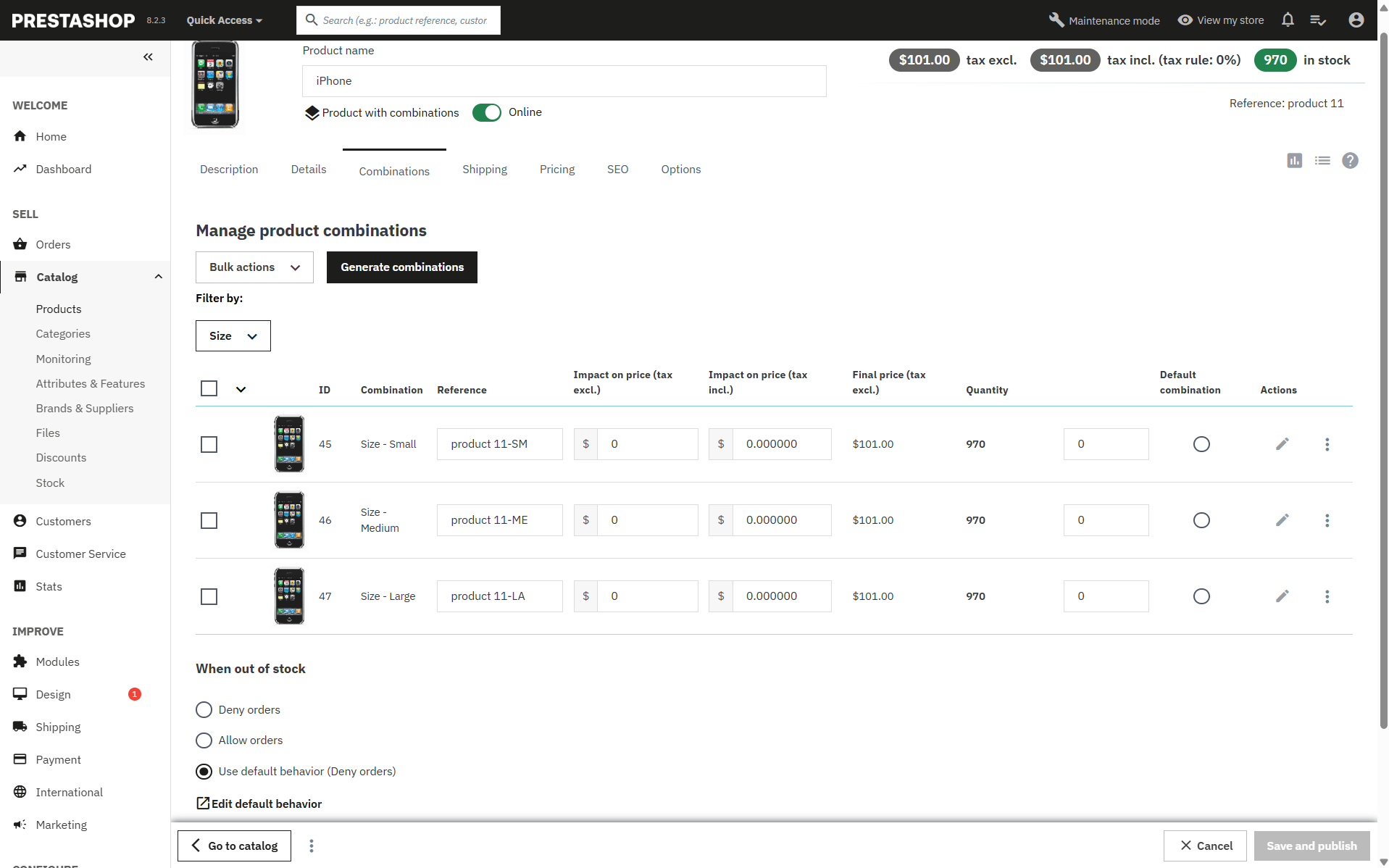
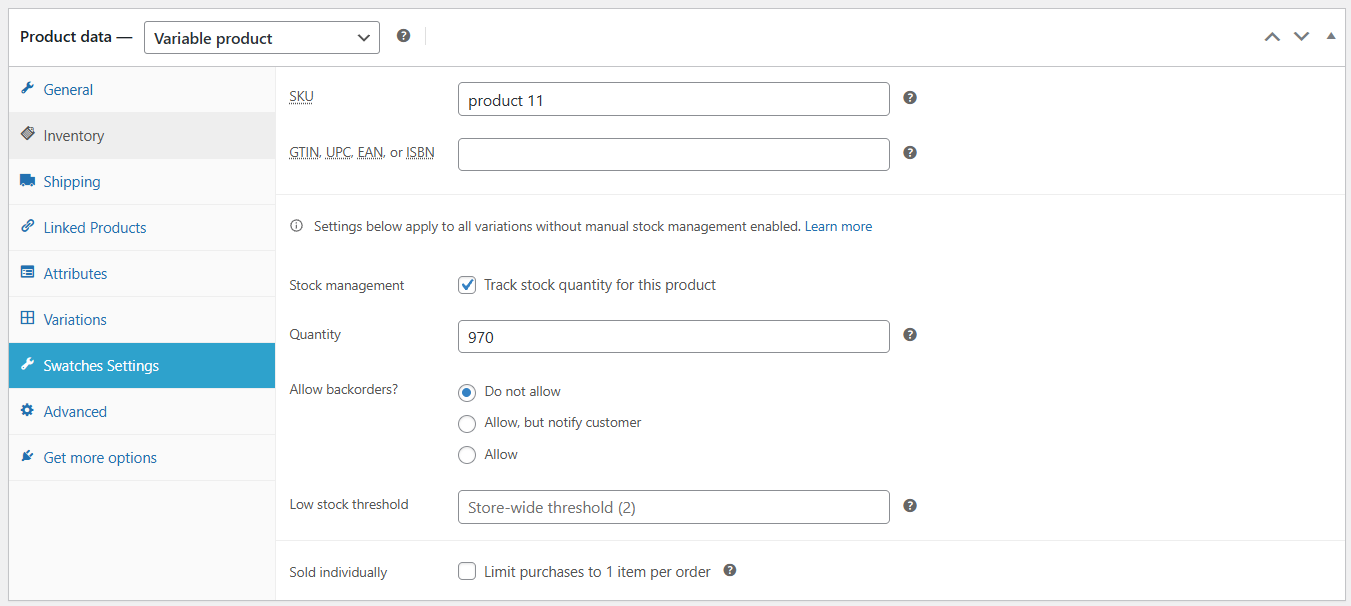
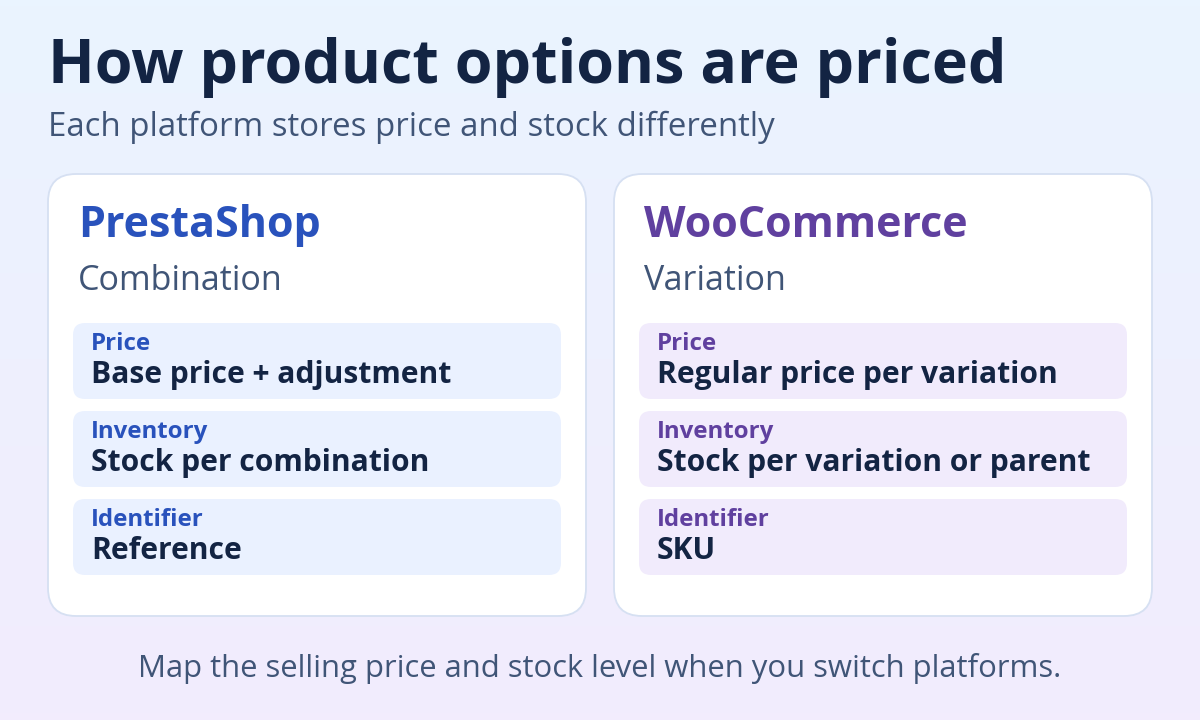
PrestaShop combinations can have their own reference, stock and price adjustment. For a file containing final prices by SKU, reconcile those prices against the base product price plus the combination adjustment. Specific prices can also depend on customer group, quantity or currency. Test trade prices with the appropriate customer account and applicable discount rules rather than relying only on the base price in the catalog.
WooCommerce stores a regular price for each variation, which can also have its own image and SKU. Stock may be tracked for individual variations or at the parent product level. A feed designed to send separate quantities per SKU needs different handling if several variations draw from one parent count.
Both the PrestaShop import tool and WooCommerce product CSV importer support spreadsheet-based catalog work within their respective import capabilities. Consider whether staff can prepare and verify those files reliably before paying for a connector. Moving the catalog to a different platform does not eliminate this mapping work.
Run multiple storefronts and markets
Offering another language or currency within one store is a different undertaking from operating a second storefront with its own assortment, staff and delivery rules. Establish which records must be shared and which need to remain independent.
PrestaShop has built-in localization and Multistore. Its shop groups can share available quantities for identical products. In the documented PrestaShop 8 configuration, sharing orders requires both customer and quantity sharing; once orders have been accepted, that order-sharing setting cannot be disabled. Check the rules for your installed version before establishing a shop group.
Imagine a blue jacket with one unit left in shared stock. A sale in one shop should leave the other shop with no unit available, even if their delivery rules differ. If a warehouse has already shipped the jacket while the storefront still offers it for sale, determine which system owns the stock count and how the update reaches both shops.
Separate WooCommerce stores require an explicit mechanism to exchange shared data. An extension such as Products and Orders Sync or a warehouse integration may support that work; include licensing, monitoring and resolution of delayed or conflicting updates in the operating plan. Translation or currency extensions for one store do not solve inventory sharing between independent stores.
Publish content and manage extension dependencies
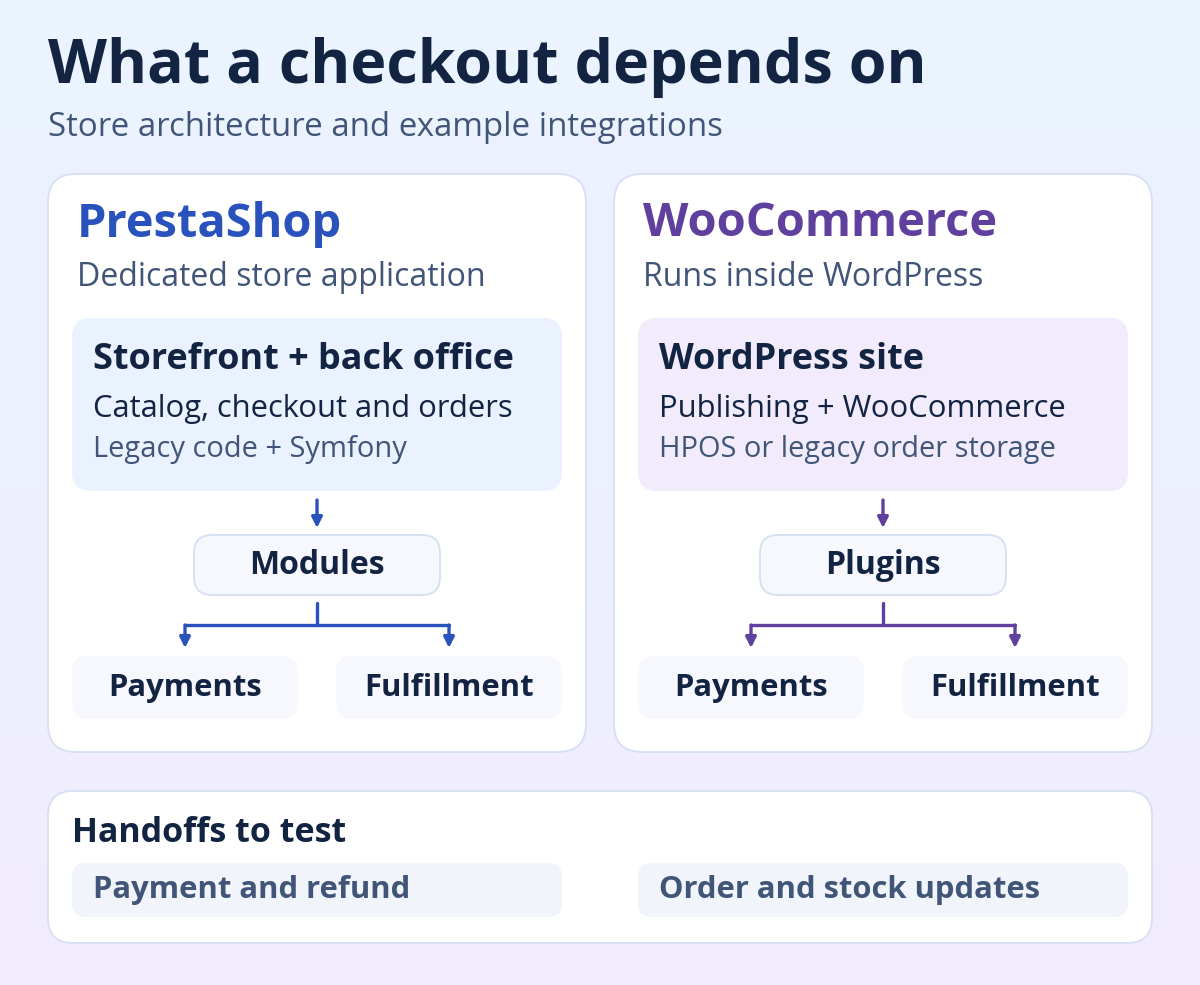
WordPress makes it practical for the same staff to update an editorial landing page and the products it features. That relationship is valuable when articles and buying guides contribute to sales. In PrestaShop, the catalog, orders and storefront sit in one commerce application, with modules for additional functions. A separate publishing site can be worthwhile, but it adds a system and an integration boundary to manage.
The decision should also account for maintenance. PrestaShop 9 combines existing legacy code with components migrated to Symfony, so a version upgrade may require changes to older modules. In WooCommerce, subscriptions, fulfillment and other jobs can depend on several WordPress plugins and their compatibility with core updates. In either case, inventory the extensions that actually support revenue or order processing, and test those workflows before applying an update to the live store.
Process checkout, orders, and refunds
Payment approval means little to staff if the order never reaches the warehouse. Compare the checkout each store uses and follow the order through payment, recording, inventory and fulfillment.
- PrestaShop
-
The 9.2 release includes a One Page Checkout module and offers a choice between one-page and four-page flows. Availability depends on the installed version. Payment and shipping modules must work with the chosen flow.
- WooCommerce
-
Cart and Checkout blocks require compatible gateways and extensions; a gateway that supports another checkout configuration may need a different integration. Check the actual checkout rather than relying on the gateway name alone.
Gateway support also determines which currencies the store can charge and refund in. Order storage adds a further consideration in WooCommerce: High-Performance Order Storage (HPOS) uses dedicated order tables and has been enabled by default for new installations since 8.2. Existing stores may use WordPress post storage, and compatibility mode can synchronize both. Reporting and fulfillment integrations must work with the authoritative order storage. If a follow-up job stalls, Scheduled Actions can help establish whether it is queued or failed.
Use the gateway, shipping method and discount your customers will use in a purchase and refund test. Complete the local shipping and payment configuration first. Follow the transaction through each stage:
| Stage | What the transaction should show |
|---|---|
| Before payment | The shopper sees the correct shipping option, tax, discount, and total. |
| After payment |
Stock changes at the correct level. The order reaches fulfillment with an identifier the receiving system can use. |
| After a refund |
The payment and order status agree. Inventory follows the return policy. Include a partial refund after shipment if it occurs regularly. |
Imports can also leave a storefront displaying outdated stock while quantities are being updated. If catalog imports overlap with sales, repeat the transaction test during an import. This will help determine whether an integration or scheduling change is needed before the store relies on that workflow.
Assign responsibility for hosting, updates, and recovery
A hosting provider may handle the server without taking responsibility for a payment module that stops working after an upgrade. Establish who maintains the application and who can restore the store, reconcile orders placed after a backup and verify checkout before reopening.
| Setup | What you get | Responsibilities to assign |
|---|---|---|
| Self-managed PrestaShop |
PrestaShop Open Source is the community project. PrestaShop Classic is a free self-install offer that features PrestaShop 9.2. |
Your team or agency handles hosting, backups, upgrades, and module compatibility unless a contract covers them. The store’s installed version governs upgrade and module support. |
| PrestaShop Hosted |
The offer lists PrestaShop 8 as its base. Installation, hosting, support, and a preinstalled payment solution are included. |
The hosting terms define coverage for staging, backups, file access, and module changes. Processing fees and supported markets depend on the payment provider. |
| PrestaShop Enterprise | PrestaShop Enterprise is a platform-as-a-service offer. |
The contract determines who manages releases and recovery. Warehouse or ERP integrations depend on the access the provider permits. |
| Self-managed or managed WooCommerce |
Install WooCommerce on your own WordPress host or use a managed plan. The WordPress.com Commerce plan includes WooCommerce and selected extensions. |
Managed coverage varies by provider. The hosting contract sets the terms for staging, backups, restores, and access for plugins and migration. Your team needs a named owner for verifying checkout and order handling after updates. |
Before choosing a hosting offer, ask which of these duties the contract actually covers. The ability to restore a backup is particularly important if the business cannot simply recreate the orders or stock changes made since it was taken.
Compare first-year operating costs
Free core software removes one licensing expense; it does not remove the cost of operating the application. For a useful comparison, put hosting, configuration, integrations, extensions, maintenance labor, payment processing and migration in separate budget lines. Estimate processing fees from your own order mix, including any fees applied through free extensions.
Self-managed server and daily backups
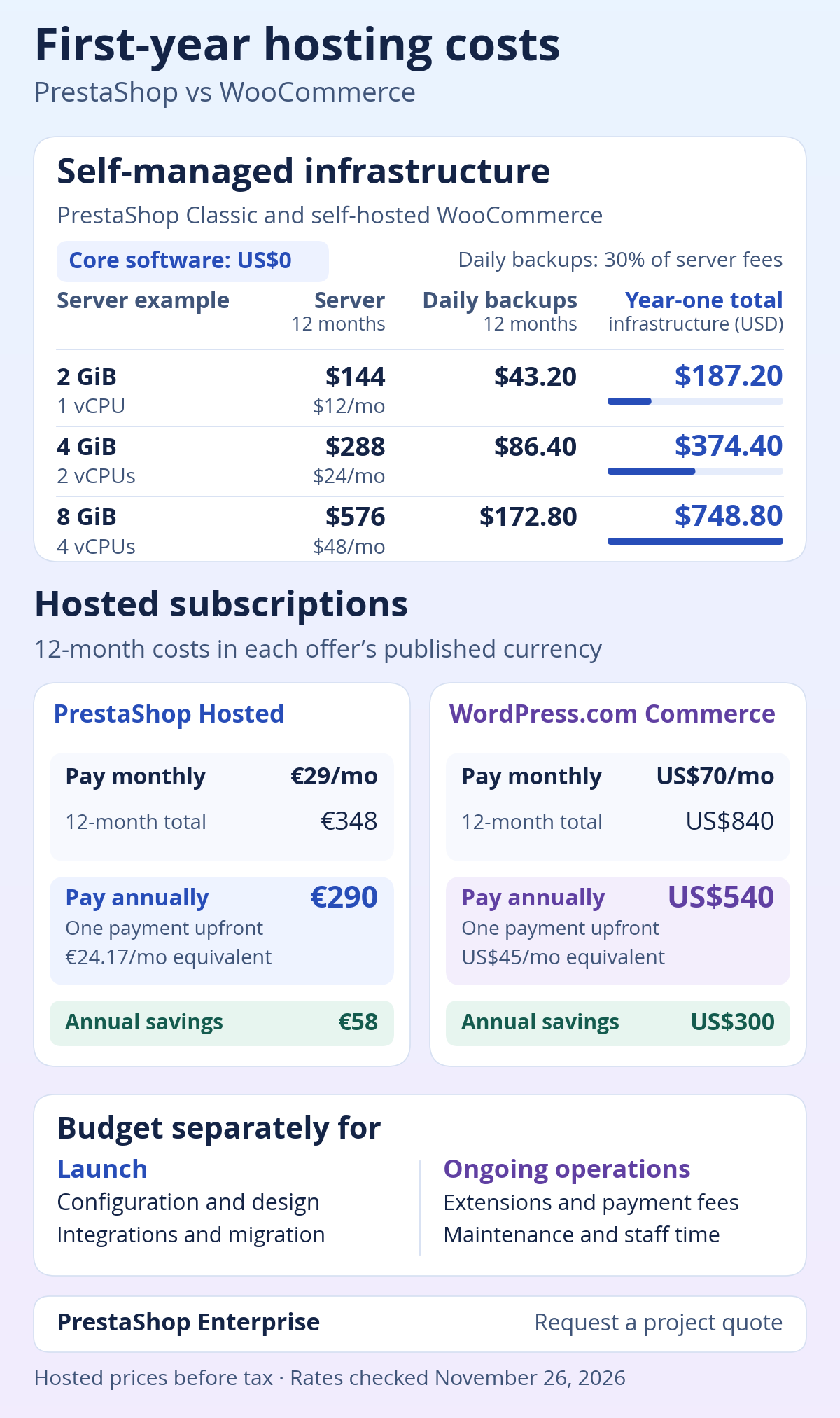
WooCommerce core and PrestaShop Classic are free to download. These examples use DigitalOcean Basic Droplet rates over 12 months, with daily backups adding 30% of the server cost. All amounts are in US dollars. Choose a server size for the actual catalog, traffic, orders and background jobs; the examples are not sizing recommendations.
| Memory and CPU | Server per month | Server for 12 months | Daily backups for 12 months | First-year infrastructure |
|---|---|---|---|---|
| 2 GiB · 1 vCPU | $12.00 | $144.00 | $43.20 | $187.20 |
| 4 GiB · 2 vCPUs | $24.00 | $288.00 | $86.40 | $374.40 |
| 8 GiB · 4 vCPUs | $48.00 | $576.00 | $172.80 | $748.80 |
A merchant with an in-house administrator may spend less on paid maintenance than one who needs an agency to handle releases and recovery. Those responsibilities remain even when both stores use the same server specification.
Hosted subscriptions by billing term
Hosted subscriptions package some of the operating work into the provider's fee. The following examples compare billing terms within each named offer, rather than comparing currencies or assuming the two subscriptions include identical services.
| Billing detail | PrestaShop Hosted | WordPress.com Commerce |
|---|---|---|
| Month-to-month payment | €29 | US$70 |
| Total after 12 monthly payments | €348 | US$840 |
| One annual payment | €290 | US$540 |
| Monthly equivalent of the annual payment | €24.17 | US$45 |
| Difference over 12 months | €58 | US$300 |
Rates checked November 26, 2026.
- PrestaShop prices exclude VAT. WordPress.com figures use US pricing and exclude tax.
- The differences compare monthly and annual billing within the same plan and currency. Twelve-payment totals assume the monthly rate remains unchanged.
- Renewal terms can affect longer-term costs. PrestaShop Enterprise requires a project quote.
Use the tables as starting inputs for comparable quotes. Find out which maintenance, recovery and integration tasks still fall to your team under each offer. A lower hosting bill can be offset by recurring extension charges or the time spent preparing imports and resolving conflicts. For an existing store, add the one-time expense of transferring data, rebuilding affected workflows and testing the new setup. Compare the resulting estimates over the same period and in the same currency.
What needs to survive a platform migration?
The operational comparison identifies which parts of the store need special attention during a move. A matching record count is useful, but a product, customer account or order must also work in the destination as the business expects.
Product options, stock, and order references
- WooCommerce to PrestaShop
-
Existing variations become combinations on supported connections. Establish the desired catalog, languages and shop assignments, and test the resulting prices. If WooCommerce uses shared parent stock, decide how that quantity should be represented rather than copying it independently onto every combination.
Where the source relies on conditional options or customization plugins, determine whether the destination needs a separate representation before defining the migration scope.
- PrestaShop to WooCommerce
-
The base price and combination adjustments must yield the intended selling prices for the new variations. Check the reference, image and stock for each representative option.
The default Next-Cart import assigns new internal WordPress or HPOS order IDs and stores the original order number separately, using the source ID if there is no distinct number. If ID preservation is available and required, assess that option and identifier conflicts separately.
Decide which order reference staff, accounting and fulfillment systems actually use. A matching displayed order number is not proof that a database identifier or an external integration link has stayed the same.
Validate data against real store workflows
Select examples that expose the differences you found in the platform comparison, including a product with multiple options and a customer with orders. Define the expected result before copying the sample.
-
Catalog
A product with options retains the intended SKU or reference, selling price, image, stock and shop or language assignments. If a quantity or price differs, resolve the mapping before moving the full catalog.
-
Customers and orders
A test customer can sign in or complete a password reset where required. For orders in scope, verify the account's order history, references and fulfillment status. If the order is present but the account cannot see it, investigate the relationship rather than assuming the transfer succeeded.
-
Extension data
Where custom fields, subscriptions or other extension data are in scope, test a record that depends on them. Confirm the intended behavior in a suitably configured destination; if the standard transfer cannot reproduce it, agree separate handling before relying on that workflow.
Protect URLs and reconcile the cutover
Identify the product, category and content URLs that bring visits, links or sales. Keep them where the new structure allows. For permanent changes, prepare a mapping to the corresponding new pages; see Next-Cart's guide to preserving URL continuity with 301 redirects for background on that work.
-
Cutoff and ownership
Agree when the final update will take place and who will reconcile new records and changes to orders or quantities already transferred. Distinguish importing new records from updating previously migrated fields; the required actions depend on the supported configuration.
-
Reconciliation after the final sync
Compare open orders, fulfillment status and available stock with the live source at the agreed cutoff. Resolve customer-impacting differences before directing shoppers to the new store. A repeat or recent-data migration is not continuous synchronization.
-
Sign-off and traffic switch
Approve the sample, checkout and final reconciliation results. Set permanent 301 redirects for changed URLs with relevant replacements, update internal links, and keep redirects active for at least a year where possible. Check redirect targets before switching traffic.
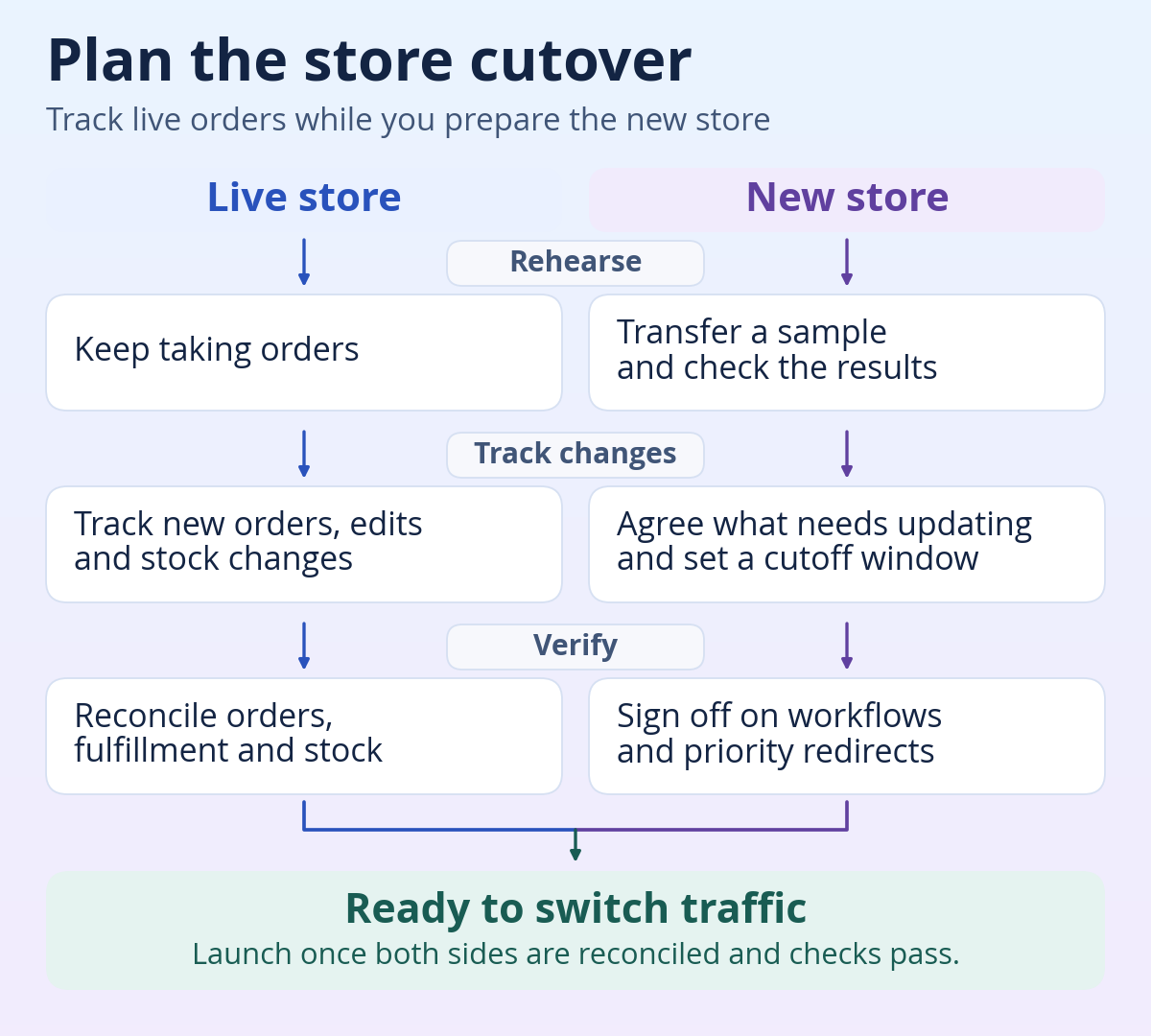
After launch, investigate redirect loops, soft 404s and other common Google Search Console errors after migration. Redirects help visitors and search engines find the new pages; they do not guarantee that rankings or traffic will remain unchanged.
Migrate to PrestaShop or WooCommerce with Next-Cart
Whether you choose to migrate to PrestaShop or migrate to WooCommerce, Next-Cart offers migration options from a wide range of eCommerce platforms. The catalog and workflow checks above help establish what needs to carry over.
For stores on Next-Cart's standard supported platform list, the migration directory lets you check the exact source-to-target route, supported data and migration options. If your current store runs on a custom-built or otherwise unlisted platform, Custom Migration can cover the extraction, conversion and transfer work required for either destination, subject to available data access and an agreed project scope.
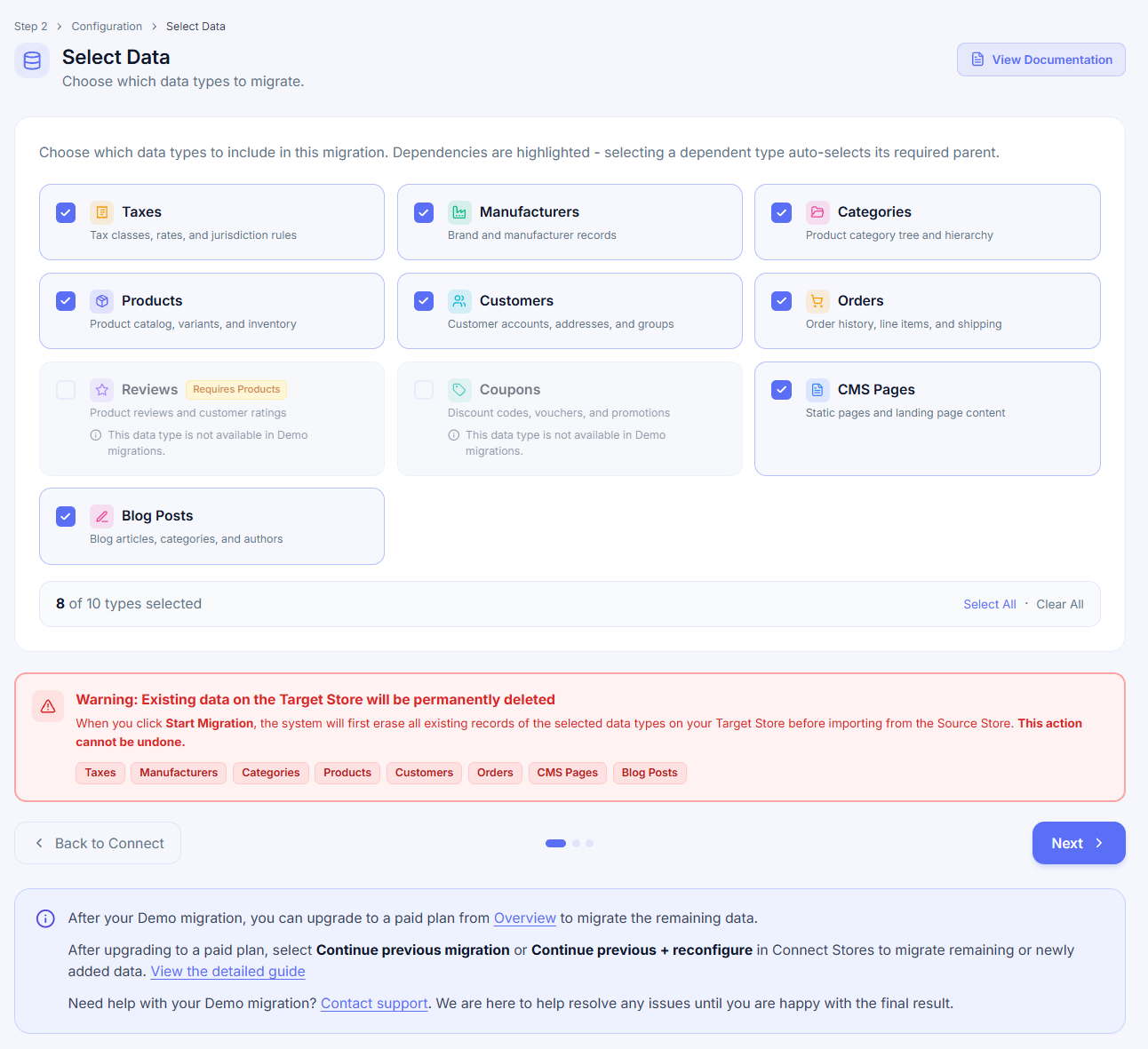
Where supported, start with a free Demo Migration to inspect a limited sample of data. The available record types and options, including reviews and coupons, depend on the Demo configuration for the route. Add-ons and custom work need separate assessment. A successful sample can establish whether the selected mapping is suitable for those records; it does not validate every extension or checkout workflow.
If a selected configuration clears existing destination records, use a test destination that contains no data you need to retain.
Choose the service according to who should carry out the supported transfer and whether the required result needs tailored work. Managed Migration does not expand the standard data scope merely by assigning the work to a technician.
| Service | Who runs the migration | Scope and store-owner responsibilities |
|---|---|---|
| Standard Migration |
Your team operates the tool. Next-Cart technical support is available. |
Connect the stores and configure the supported transfer. Review the results. |
| Managed Migration |
Next-Cart technicians operate the agreed supported migration. They can perform Re-Migration and Recent Data Migration on request within the active migration lifetime. |
Your team provides access and requirements. Your team reviews the results and signs off on the workflows needed at launch. |
| Custom Migration |
Choose Self-Execute after the agreed Customization is prepared, or Expert Handle if expert execution is included in the scope. |
For unlisted platforms or requirements beyond supported migration behavior and Standard Add-ons, agree the custom work required. Provide representative records, business rules, and validation criteria. App installation and destination implementation are separate unless agreed. |
For a self-managed move to WooCommerce, Next-Cart's WooCommerce Migration Plugin offers a free edition covering up to 50 each of products, customers, orders, blog posts and CMS pages. This plugin is a separate entry point from the limited Demo described above.
The migration estimate depends on the Entity Points Plan required for products, customers, orders and blog posts, as well as the service, selected Add-ons and any agreed custom scope. Use the migration pricing calculator for a route-specific estimate. Custom work and Expert Handle where included can affect the final quote. Establish the representative sample and validation requirements before purchasing the full transfer.
Make the platform decision
PrestaShop deserves closer evaluation when a dedicated catalog and shop-group controls fit the team's operations. WooCommerce is a strong candidate when publishing and commerce belong in the same WordPress workflow and the required extensions work together.
For an established store, identify the problem that is expensive or difficult to solve today. If fixing a stock feed, changing hosting or replacing an incompatible extension would resolve it, compare that cost with replatforming. A move is justified when the destination can meet an important business requirement or materially reduce operating effort, and the benefit outweighs the migration and reconstruction work. Use a tested representative workflow and a complete cost estimate to make that decision.