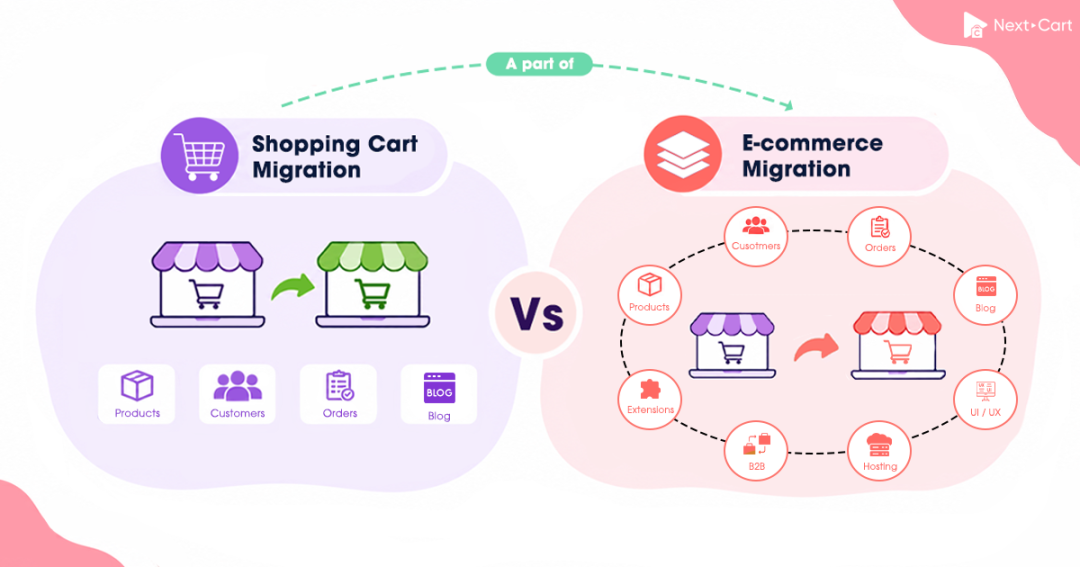
Shopping cart migration and e-commerce migration overlap, but they can suggest different scopes of work. A shopping cart migration may focus on products, customers, and orders, while a broader e-commerce migration may also address custom data structures and application-related requirements. Either can sit within a replatforming project involving storefront, integration, or operational changes. For a move to Shopify, understanding the agreed data-transfer scope helps clarify what transfers, what needs separate implementation, and who handles each part.
Shopping Cart Migration vs. E-commerce Migration: What’s the Real Difference?
In brief
Shopping cart migration can suggest a focused transfer of store records, such as products, customers, and orders, between platforms. It can still involve complex mappings and custom fields.
E-commerce migration can describe an expanded migration scope, including more intricate data structures, extension- or app-owned records, and related configurations that can be translated for the destination.
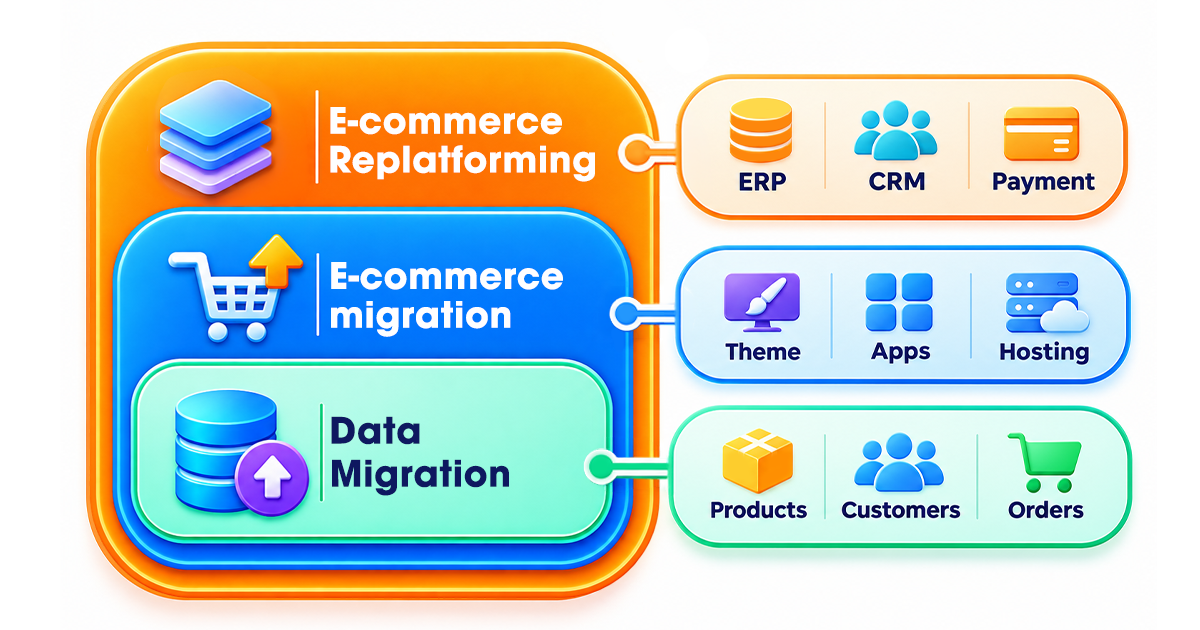
Replatforming is the wider platform-change project. It may combine migration with UI/UX redesign, application implementation, integration changes, and operational preparation. A migration can also be a standalone engagement.
OpenCart, Zen Cart, and X-Cart retain the vocabulary of “shopping cart software,” which already managed catalogs, accounts, orders, and administration as well as checkout. As commerce systems connect with fulfillment, inventory, marketing, and other business applications, migration requirements can extend well beyond moving a basic catalog.
That expansion provides a useful way to understand the two migration terms. “Shopping cart migration” can bring a bounded data transfer to mind; “e-commerce migration” can frame a more extensive transition. These are flexible associations, not standardized definitions. Usage varies, and a provider may use either name for complex work. The older terminology does not imply less capable software or a simpler database.
For example, moving products, customers, and order history into a prepared destination store is a focused migration. Adding extension-owned records, custom relationships, and configuration mappings expands the data work. Redesigning the storefront, replacing a CRM integration, or changing payment arrangements adds implementation work that belongs in the wider project plan.
Shopify’s replatforming guidance likewise describes a broader architectural change involving the site and its supporting systems. Which systems change depends on the project; a CRM upgrade or checkout overhaul is not required for every move.
When comparing proposals, separate two outcomes:
- Data-transfer result
- Agreed records, relationships, and compatible configuration values arrive in the destination and can be checked against their intended use.
- Destination-store implementation
- Required themes, checkout, apps, integrations, operating procedures, and launch arrangements are prepared.
One provider or separate teams can own these outcomes. Both need documented responsibilities and acceptance checks.
Key Differences at a Glance: Scope, Cost, Timeline, and Risk
The comparison below uses a focused shopping cart migration and an expanded e-commerce migration to illustrate how scope can grow. These are planning examples, not fixed definitions or service tiers. Either label may be used for either engagement.
| Decision factor | Shopping cart migration: focused transfer example | E-commerce migration: expanded scope example |
|---|---|---|
| Underlying task | Move agreed store records, map their fields and relationships, and verify the result. | Retain that source-to-target foundation while accommodating additional structures and application-related data. |
| Typical association | A bounded cart-to-cart transfer into a destination whose implementation is handled separately. | A wider migration engagement shaped by connected systems and more extensive data requirements. |
| Scope of work | Define supported entities, selected options, mappings, and exceptions. | Add agreed custom structures, application data, and compatible configuration mappings. List implementation deliverables separately. |
| Data coverage | Products, categories, customers, and orders provide a familiar starting point; other supported records may be included. | Coverage may extend to reviews, localization, custom attributes, and app-owned records. Support remains specific to the platform pair. |
| Platform architecture | Exports, database connectors, and APIs can all support a focused transfer. | Multiple APIs, custom schemas, or headless and composable systems may add dependencies. Architecture is not determined by the migration name. |
| Mapping and complexity | Supported mappings may be sufficient, with specific exceptions reviewed. | Custom fields, external IDs, unusual relationships, and transformations may need tailored handling. |
| Execution and ownership | A merchant, technician, or migration specialist can perform the transfer. | Those models still apply; expanded work needs clear handoffs between migration and implementation owners. |
| Custom code and apps | Extension-owned data may need extraction and mapping. The original extension’s behavior does not transfer with those records. | More application data and configuration may be in scope. Replacement apps and rewritten functionality require explicit implementation tasks. |
| ERP, CRM, PIM, and WMS | Preserve relevant identifiers and relationships so the business can reconnect its systems. | Map cross-system data dependencies and agree how continuity will be verified. Reconnecting or replacing integrations needs a named owner. |
| Storefront and user experience | Catalog transfer leaves the target theme, menus, and checkout to the implementation team. | A broader engagement may coordinate with a redesign or new frontend. That work belongs in the replatforming plan and must be explicitly included. |
| SEO and content | Supported content and metadata can transfer; assign URL mapping, redirects, and validation separately. | Additional content structures and changed URLs can expand the checks. Require redirect tests and search monitoring under either name. |
| Scale and effort | A small catalog can still contain difficult subscriptions, variants, or customer-specific prices. | More data dependencies and teams can increase effort. Record count alone remains a poor measure of complexity. |
| Timeline | Access, record volume, mappings, transfer runs, and data checks set the transfer schedule. | Additional data handling and review extend that schedule. A replatforming launch may also depend on builds, integration tests, and approvals. |
| Cost | Estimate supported entities, add-ons, exceptions, and execution responsibility. | Add the agreed tailored data work. Include design, development, and launch coordination only when pricing the wider project. |
| Risk and acceptance | Check missing records, incorrect variants, broken relationships, and incomplete validation. | Also check custom structures and application data. Test checkout, integrations, and launch readiness where those systems change. |
For planning, separate the work into three levels:
- Supported entity transfer: move standard records and verify their relationships.
- Tailored data work: handle custom fields, external IDs, unusual entities, or transformations beyond the standard route.
- Broader platform implementation: coordinate data work with storefront development, integrations, SEO, and go-live tests.
The first two levels describe data work that may be sold under either migration name. The third places that work within a broader replatforming project. A supported transfer plus one transformation may be sufficient; a full rebuild is not automatically needed. Subscriptions, B2B pricing, and record relationships can drive complexity even when product counts are modest.
What Actually Transfers vs. What Doesn’t in a Migration
A transferred catalog does not supply a working checkout or replace a plugin. Check whether “complete store migration” means complete data transfer or a functioning destination store.
Data That Typically Transfers
Coverage depends on the source-to-target route and selected options:
-
Products and catalog details.
Names, descriptions, images, SKUs, prices, options, variants, attributes, and supported stock fields. Options and inventory must remain associated with the correct sellable records.
-
Categories and collection structures.
Names, descriptions, hierarchies, and product assignments where supported. A category hierarchy does not necessarily recreate target navigation.
-
Customers and addresses.
Profiles, contact details, billing and shipping addresses, and supported groups. Passwords and sign-in behavior need separate compatibility checks.
-
Orders and their details.
Historical line items, totals, taxes, discounts, statuses, addresses, and customer associations where available. These records need usable relationships, not just matching totals.
An order total alone cannot show a support team what was purchased or whether it belongs to the correct customer.
-
Reviews, coupons, and other commercial records.
Coverage varies by platform pair, selected options, and additional mapping; it is not guaranteed with every product migration.
-
CMS pages, blog posts, and SEO fields.
Supported text, media, and metadata can move. Changed URL structures still require a redirect plan.
Check the exact Source Platform, Target Platform, and version. Configuration, API permissions, extensions, purchased add-ons, and approved customization affect available fields.
Counts alone cannot confirm usable data. For a product with three size options and different quantities, inspect each variant’s option values, SKU, and stock. For a customer-linked order, check the customer, line items, addresses, totals, and status together.
What Needs Reconfiguration or Tailored Handling
An expanded e-commerce migration may include extension-owned records or configuration values, provided they can be extracted and represented in the destination. For example, a custom attribute can map to a target field, while a rule that uses that attribute may need to be rebuilt. Transferring the stored value does not recreate the behavior around it.
Payment credentials, subscription engines, and integrations also need target-compatible configuration or implementation, even when related data is accessible. These dependencies should be visible in the wider project scope.
| Requirement | Why a direct data transfer is usually insufficient | Typical responsibility to clarify |
|---|---|---|
| Storefront theme and layout | Templates, styling, and interactive components belong to the source platform’s presentation system. | Rebuild or adapt the destination theme, navigation, layouts, and accessibility behavior. |
| Apps, plugins, modules, and custom code | The destination may not run the same extensions or understand their private data structures. | Select replacement apps; configure them; scope proprietary data and custom logic separately. |
| Payments, checkout, tax, and shipping | Gateways, credentials, checkout behavior, tax setup, and carrier connections depend on the target and merchant accounts. | Configure the destination settings and complete transaction and fulfillment tests. |
| ERP, CRM, PIM, WMS, and marketplace connections | Transferred records do not establish authentication, live synchronization, or correct system ownership. | Reconnect integrations, map external identifiers, test data flows, and decide which system owns each field. |
| Customer login and subscriptions | Authentication models, password hashes, payment tokens, and subscription engines may be incompatible. | Confirm account continuity and separately plan activation, renewal, or integration work. |
| SEO redirects and site configuration | Old and new URL paths often differ even when catalog and content records are intact. | Map important URLs, implement redirects, update links, review canonicals and sitemaps, and monitor search. |
Transferred records may also need field and relationship mapping. These architectures illustrate how source access and target validation affect the work:
| Platform architecture | Relevant data structure | Migration implication |
|---|---|---|
| Adobe Commerce / Magento Open Source | The Entity-Attribute-Value model can store catalog and customer attribute values across related tables. | Assemble the required source values before mapping them into compatible target fields. Reading a product’s main record alone may miss attributes. |
| Shopify | ProductVariant records belong to a parent product; metafields and metaobjects can hold additional structured information. | Verify which product and variant each option, SKU, inventory item, and custom attribute belongs to. |
| WooCommerce | High-Performance Order Storage can put order records in dedicated tables rather than traditional WordPress posts and post meta. | Identify the authoritative order storage and use supported access methods; do not assume every store has the same order-table layout. |
Self-hosted stores may allow authorized connectors or exports; hosted platforms may expose specific authenticated APIs. Permissions can hide fields, pagination and rate limits affect retrieval, and target validation can reject source values. Confirm access and limits before estimating transfer time.
Example: How OpenCart Data Maps to Shopify
The OpenCart-to-Shopify field comparison distinguishes renamed fields from changes in representation. Name to Title is direct; variant stock and promotional pricing need closer checks.
| OpenCart source | Shopify destination | What the mapping illustrates |
|---|---|---|
Product Name |
Title |
A direct correspondence for the displayed product name. |
Model |
SKU |
The source’s model identifier is represented through the target SKU field. |
Manufacturer |
Vendor |
Supplier or brand information occupies a different destination field. |
Product Option and Option Value |
Product option and option value | Buying choices must remain linked to the variants they describe. |
Option Quantity |
Variant inventory | Stock must be associated with the correct sellable variant. |
Product Categories |
Product Collections |
Merchandising groups need target-compatible associations; the store’s menu structure is a separate concern. |
Special Price |
Price when a compare-at price exists |
The intended selling price depends on the supported pricing relationship, not just the source field name. |
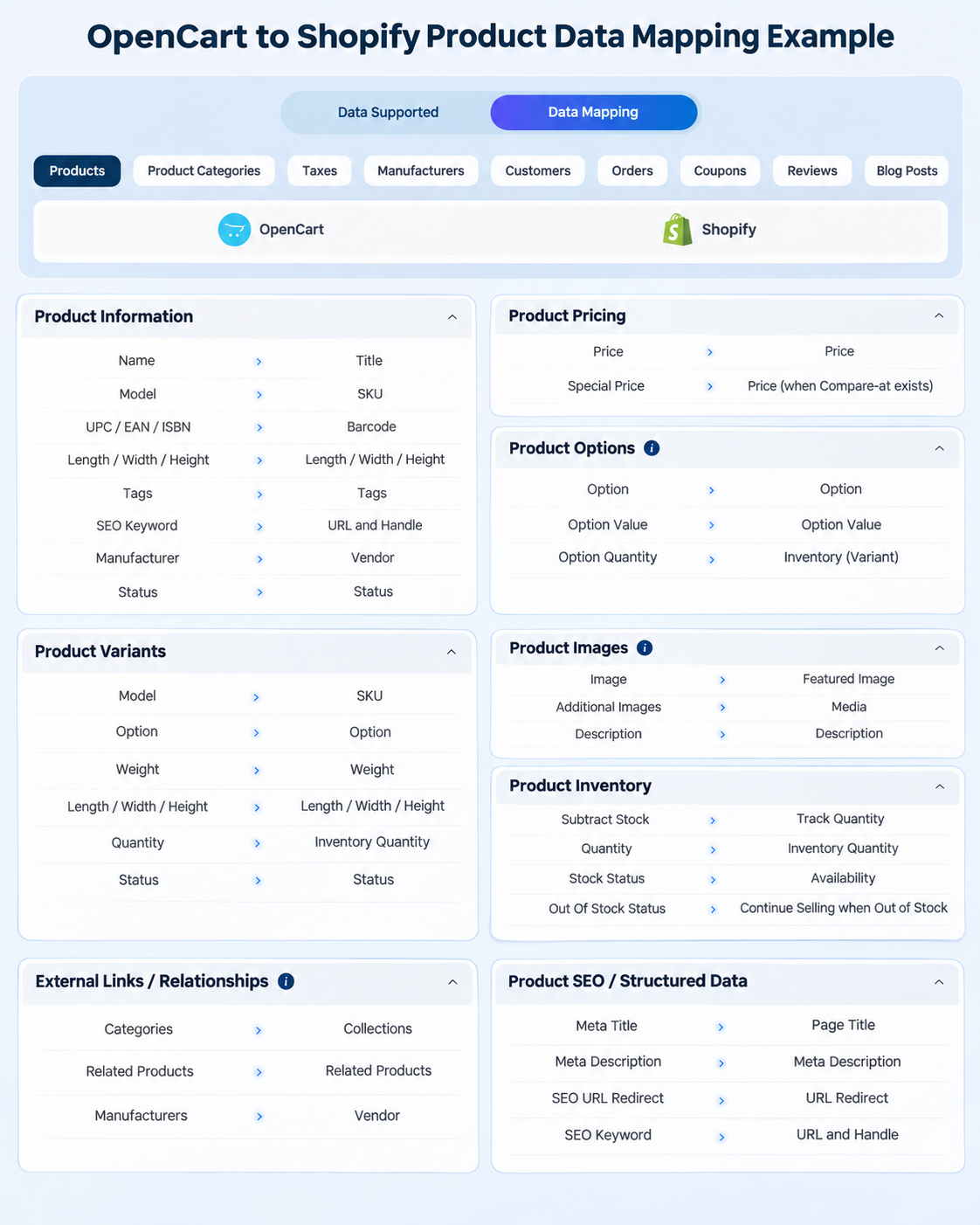
For an illustrative size-variant product, compare source options, SKUs, and quantities with each Shopify variant and its inventory. Select each size on the storefront to confirm it resolves to the intended variant. A parent product with the right title does not establish that its sellable combinations work.
Where the conditional pricing mapping is supported, inspect both selling and compare-at prices for a product with a regular and special price. Check what shoppers see: a present product record can still carry an incorrect price relationship.
Confirm the intended vendor and collection assignments where supported; collections do not build the menu. This example covers products. Reviews, coupons, customer and order history, CMS content, SEO fields, and extension records need their own route-specific coverage and checks.
What the Migration Name Leaves Open
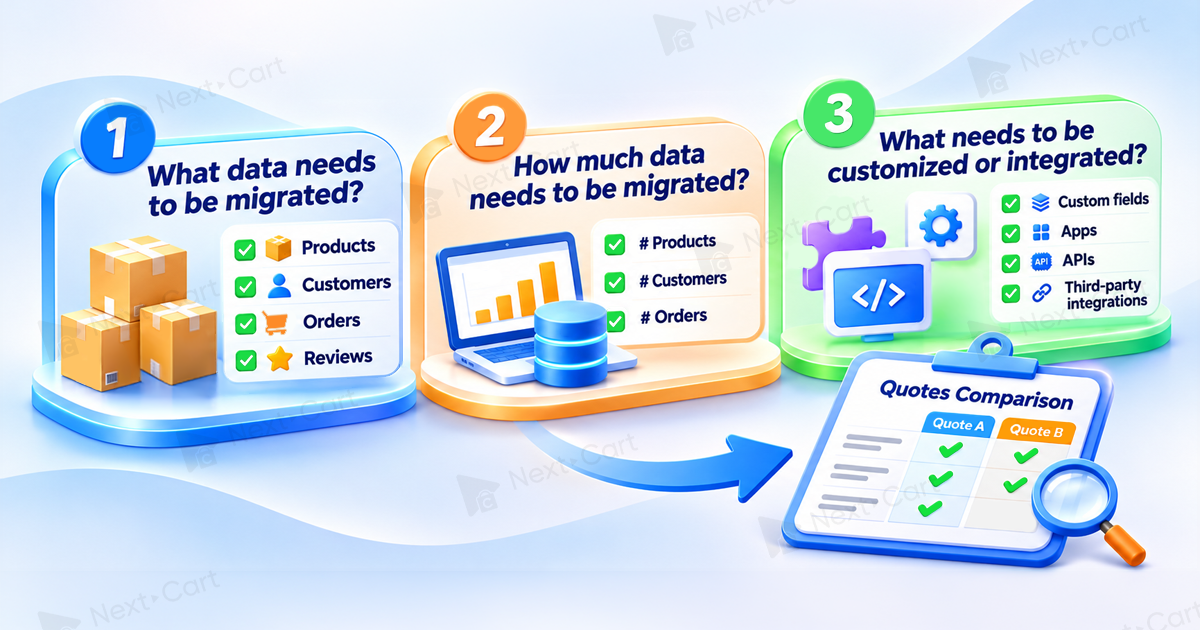
Two similarly titled quotes can leave different work unassigned.
Store owners need to distinguish usable transferred records from a launch-ready store. Agencies and project managers need clear development handoffs. SEO specialists need an owner for redirects and monitoring. These responsibilities should be visible before work starts.
Ask for evidence across five areas:
-
Supported data and target behavior
Request entities, fields, attachments, relationships, and handling for unsupported attributes. Use representative products with options and customer-linked orders to identify exceptions before the final run.
-
Destination-store preparation
Assign theme, checkout, tax, shipping, replacement apps, and connected systems. Name the checkout and fulfillment test owner; transferred data does not prove working functionality.
-
SEO continuity
Assign old-URL inventory, destination mapping, redirect tests, internal links, canonicals, sitemaps, and monitoring. Google’s site-move guidance explains these checks and warns that rankings can fluctuate.
-
New activity before launch
Plan for new orders and changes to previously transferred records, with a reconciliation owner and cutover window. An online source store during transfer does not guarantee uninterrupted checkout at launch.
-
Acceptance and ownership
Name reviewers, evidence required for each check, and unresolved exceptions. Keep data acceptance separate from permission to open the storefront.
Use source-to-target record comparisons, product-option selection, customer-order checks, and integration tests as applicable.
New records and changed fields require different handling. The Data Update add-on updates selected supported fields of records previously migrated by Next-Cart, provided their target records still exist. It does not create records or provide continuous synchronization. Confirm the supported continuation method and fields for the actual route.
The proposal should identify who resolves a missing attribute, rejected external identifier, or absent redirect, and what evidence closes the issue. Otherwise, an individual provider can finish while the store remains unready.
Compare quotes against the same work breakdown
One quote may exclude storefront development and redirects because an agency owns them; another may include that work. Itemize exclusions before comparing totals.
| Workstream | What belongs in the cost estimate | What affects the timeline |
|---|---|---|
| Data transfer and validation | Entity quantities, access, mapping, supported add-ons, custom data requirements, execution support, and agreed checks. | Permissions and access readiness, representative tests, mapping corrections, transfer runs, and review cycles. |
| Destination-store implementation | Themes, navigation, checkout settings, app replacements, custom development, and integration deployment where required. | Design decisions, technical approvals, build dependencies, integration tests, and defect resolution. |
| SEO and launch continuity | URL inventory and redirects, internal-link changes, technical SEO checks, record reconciliation, cutover, and monitoring. | Redirect preparation, launch-window constraints, final source updates, and post-launch verification. |
Keep transfer duration, implementation and testing, and cutover distinct. A completed data run can precede checkout checks and final-order reconciliation. Include separately scoped development, integration, SEO, and launch costs when comparing whole-project estimates.
How to Choose the Right Scope for Your Store Migration
Start with the destination’s readiness and the data it must receive. A focused transfer may be enough for supported records; custom structures or app-owned data can expand the migration work. Then establish who is preparing the storefront and checkout, and whether purchasing rules or integrations need to be rebuilt.
When a Focused Data-Transfer Engagement Is Enough
A focused engagement fits when:
- The platform is chosen and a merchant or developer is preparing its storefront and settings.
- Records and relationships fit supported entities and agreed mappings.
- A responsible team can configure existing functionality or replace it with suitable apps.
- Migrated data can be reviewed separately from checkout and go-live approval.
Consider a WooCommerce-to-Shopify migration while an agency builds the theme and owns payments, shipping, apps, redirects, and launch tests. A migration specialist transfers the supported catalog and history for the agency’s end-to-end checks. Someone still needs to coordinate the teams. Unsupported extension fields may require separate mapping even within this focused engagement.
When the Project Also Needs Broader Replatforming Work
Broader planning is appropriate when the move changes selling or operational systems, including:
- Headless or composable architecture, redesign, or rebranding.
- B2B contracts, permissions, customer-specific catalogs, approval workflows, or negotiated prices.
- Reworked ERP, CRM, PIM, WMS, marketplace, subscription, or fulfillment integrations.
- Changes to checkout, localization, SEO architecture, or operational handoffs.
- Launch tests involving several departments and connected systems.
A hypothetical Adobe Commerce retailer adopting a headless storefront must map historical records, rebuild B2B behavior, and reconnect its PIM and ERP. Its acceptance test goes beyond import: can a customer order under the correct account terms, and does that order reach the intended downstream system?
Here, the migration work sits within a replatforming project whose dependencies need development, integration tests, business approval, and launch ownership. A smaller exception can be scoped directly: one field transformation and an integration adjustment do not justify rebuilding unrelated storefront components.
Migration with Next-Cart: Which Service Best Fits Your Needs?
Next-Cart’s three Migration Services address two decisions: whether supported features cover the route and data requirements, and who performs the transfer. They are service models, not alternative definitions of the industry terms.
| Next-Cart service | When it fits | Who handles the migration |
|---|---|---|
| Standard Migration | The source-to-target route and data requirements fit the supported features and applicable Standard Add-ons. | The customer connects, configures, runs, and validates the migration with available technical support. |
| Managed Migration | Supported standard data handling is enough, but the customer wants Next-Cart to carry out the agreed migration actions. | Next-Cart performs the migration within that supported scope; the customer supplies access, decisions, and business acceptance. |
| Custom Migration | The desired result calls for non-standard fields, extension data, bespoke transformations, unusual relationships, or other agreed tailored logic. | The tailored scope is reviewed and quoted. Execution can be Self-Execute or include Expert Handle when agreed. |
Standard and Managed share the same supported data scope; execution responsibility differs. Custom Migration addresses requirements beyond supported options, regardless of store size. Tailored field or relationship handling does not include a theme, deployed app, ERP/CRM integration, or storefront rebuild unless explicitly included in a separate accepted scope.
A large supported catalog can fit Standard or Managed; a small store with an essential unsupported extension field may need Custom. Identify that field’s source, business use, intended destination, and acceptance test.
What to Prepare for a Migration Quote
Supply the route, difficult records, and existing responsibilities:
- Platforms and volume: Source and Target Platforms, versions, and approximate product, customer, and order counts.
- Representative records: a product with options and quantities, plus a customer with order history.
- Exceptions and timing: critical apps, custom fields, external IDs, and the launch window.
- Project boundaries: owners for storefront, integrations, redirects, final tests, and approval.
A representative transfer or mapping review can reveal variant, relationship, or custom-field problems before scope is finalized. Identify frontend, SEO, integration, and cutover work excluded from the data service.
Use the migration pricing model as a starting point for supported data work. Request a Custom Migration assessment for requirements beyond standard support, then include separately priced implementation and launch work in the total budget.
A comparable proposal answers: Which records must arrive? What needs to work around them? Who verifies each result? Missing answers leave both price and launch date uncertain.