Start Your Weebly to BigCommerce Migration Today!
Move your store from Weebly to BigCommerce with a secure, guided migration tailored to your business.


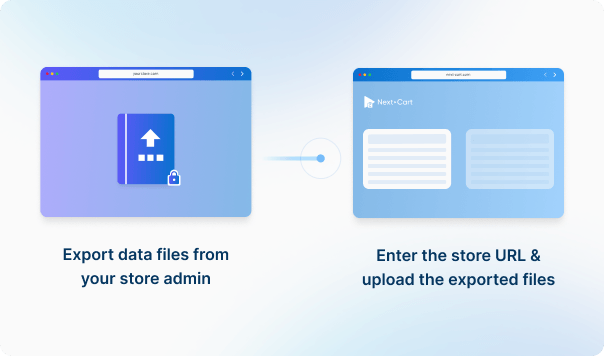




Enter the URL of the Weebly store you are migrating from and upload the required data files to establish the connection.
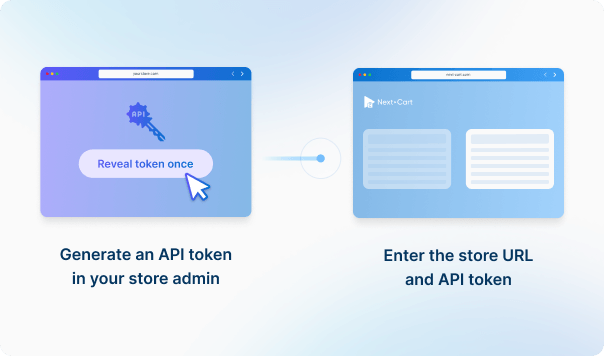
To establish the connection, enter the URL, API path, client ID and access token for the BigCommerce store you are migrating to.




 Weebly
 BigCommerceWeeblyBigCommerce

These four data types are used to estimate the price. Other supported data, including categories, coupons, and reviews, is also migrated at no extra charge.
You can increase your plan’s data limit, upgrade your service, or add custom work while your license is valid.
You only pay the price difference, and your license expiry date stays the same. Custom work is reviewed and quoted separately.
Learn about upgrades (Opens in a new tab)Confirm which destination storefront and category tree should receive each part of your catalog. Next-Cart maps category trees and product channels, but orders follow a separate rule: each uses the first mapped source storefront, with a fallback if that mapping is missing. Check catalog placement and order storefronts separately; selecting a storefront does not automatically place every data type there.
Keep it available until the product image check is complete. The default workflow reads the IMAGE field and also requests the live product page to find additional image information. A CSV export alone therefore does not establish that every referenced image is available for migration.
Preserve PRODUCT_ID across a product's variant rows and keep their separate SKU, PRICE, TRACK_INVENTORY, and INVENTORY values. The migration process uses repeated PRODUCT_ID rows to build child variants and reads up to three OPTION name/value pairs. Do not renumber those groups while cleaning the file.
Existing variants become BigCommerce variants with their supplied SKU, price and stock. Ordinary options become modifiers, with supported choice types and price adjustments, rather than separate stock-tracked variants. Check whether each choice needs its own SKU or only changes the purchase. Conditional rules and options supplied by apps may need separate handling.
Next-Cart sends the main image as the product thumbnail, adds other pictures to the gallery, and assigns a supplied variant image separately. Keep source images accessible while BigCommerce processes them. Test the picture shown for each variant, not just the gallery; custom swatches or image-switching behavior are not recreated automatically. Images inside descriptions need the separate copying option where available.
After migration, configure and test BigCommerce file delivery and customer access. For supported sources, the migration can create digital product records and keep file links in custom fields, but those references do not set up delivery files or restore download permissions. Keep the original files accessible until the delivery setup is verified.
When the source provides related-product references, Next-Cart resolves them to migrated product IDs and writes BigCommerce related-product links. It also updates previously imported products for reverse references. Include the linked products and check the results; this does not by itself recreate a separate up-sell system, cross-sell app or storefront recommendation layout.
No. BigCommerce assigns a new internal order ID. Next-Cart keeps the original number as an external reference and adds it to the order message, so staff can trace the old order without confusing that reference with the new BigCommerce ID.
No. Imported orders can retain historical shipping labels and tax and shipping amounts, but those values do not configure the new store's operational checkout settings. Review BigCommerce shipping methods, tax settings and other checkout configuration separately before accepting new orders.
Available services depend on your migration path. Standard Migration lets you use the tool yourself with technical support. With Managed Migration, our technicians carry out the agreed migration. Custom Migration covers tailored requirements, with the migration carried out by you or our team as agreed. Data types must be supported by both connections; choosing expert handling does not by itself add unsupported data.
Where a self-service Demo Migration is available for your migration path, you can try it for free before purchasing. It transfers a small sample of supported data so you can check the result. Add-ons and custom work are not included in the self-service demo. For a file-based, custom or technician-assisted evaluation, contact us first to agree the test scope and any applicable cost.
Your data types and quantities determine the Entity Points total and the plan you need. The cost also depends on your chosen service, add-ons, and any custom work. Use the pricing calculator for an estimate; custom work is reviewed and quoted separately.
If you are migrating from a live store, it can normally keep taking orders while Next-Cart copies its data. The migration does not delete or change the source data. Plan the final update and the switch to the new store separately so recent orders and other changes are included. For file-based migrations, changes made after an export require a fresh export; an uploaded file is not a live connection to the store.
Yes. Your license allows repeat runs for the same store and migration path for 12 months from purchase, within your plan’s data limit. Continuing the previous migration can add eligible new records without importing the same mapped records again.
Changing records already migrated is separate: the paid Data Update add-on can update selected fields where your source, target version and those fields are supported. Keep the existing migration links and leave target-data clearing off. It does not automatically update every field or provide continuous synchronization.
Yes. While your license is valid, you can increase your plan’s data limit and upgrade to a higher service where it is available for your migration path. You can move from Standard Migration to Managed Migration or Custom Migration, or from Managed Migration to Custom Migration.
If you already use Custom Migration, you can add custom work after a review and quote. You pay only the additional amount, and your license expiry date stays the same.


Move your store from Weebly to BigCommerce with a secure, guided migration tailored to your business.