Migrate products, customers, orders, blog posts, and other supported store data from Shopware to WooCommerce securely and accurately while preserving data relationships throughout the transfer.
Keep your store active during migration. No technical skills needed.
Free Demo Available
Preview a sample of your WooCommerce data on Shopify before running the Full Migration.
1-year License with Recent Data Migration
Keep your migration project available for 12 months and sync new or changed data with Recent Data Migration when needed.
24/7 Technician Support
Get expert help with connections, configuration, migration issues, and validation whenever you need it.
Step-by-Step Guide to Shopware to WooCommerce Migration
1
Connect your Shopware store
Enter your Shopware store URL, then download the KitConnect package, unzip it, and upload it to your Shopware website.
2
Connect your WooCommerce store
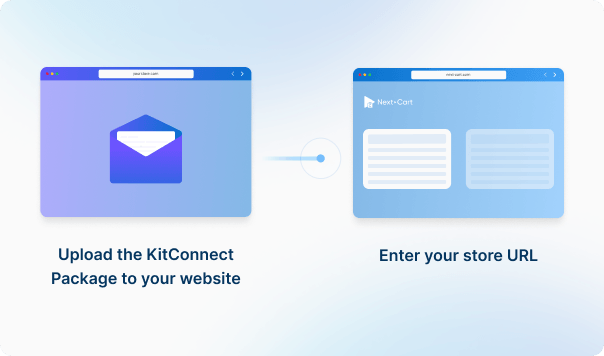
Upload the KitConnect package to your WooCommerce website, then enter your store URL to establish the connection. This allows the system to securely access your store data for migration.

3
Configure and start the migration
Select the data you want to migrate, configure your migration options, then start the migration to your target store.
4
Review results & post-migration options
Review your migrated data to make sure everything is in place, then use post-migration options such as Recent Data Migration or Re-Migration if needed.
Data You Can Migrate
Products
Product Categories
Taxes
Manufacturers
Customers
Orders
Coupons
Reviews
Blog Posts
CMS Page
All relationships (categories, variants, images, etc.) preserved
Customize your setup with
additional options
Recent Data Migration
Clear Target Store Data
Strip HTML Tags from Category and Product Names
Transfer Embedded Images to Target Store
Create 301 Redirects for SEO URLs
Preserve Product IDs & Category IDs
Compatibility Overview
Shopware
WooCommerce
Version Range
5.x – 6.7.5.0
10.4.0 - beta 2 (and all previous versions)
Language & Localization
Multilingual, Multicurrency, RTL, Localized URLs
Multilingual, Multicurrency, RTL, Localized URLs powered by WPML and Polylang
Main Editions
Shopware Online Store
WooCommerce extension
Product Types: Product, Product Variants, Product Bundles, Digital Product
Usage Restrictions: Minimum Order, Maximum Order Value, Per Customer, Exclude Sale, Products, Excluded Products, Categories, Excluded Categories, Usage Limit
Post Information: Title, Content, Short Description, Tags, SEO URL, Active, Visibility
Post Images: Media, Gallery, Images In Content, Alt
Post Categories : Category, Parent, Position
Post SEO / Structure Data: Meta Title, Meta Description, Redirect, Plugin Structured Data
Post Comments: Name, Email, Comment, Date, Status
Multi-language Post Information: Content, Short Description, Meta Title, Meta Description, URL Path
Page Information: ID, Title, Content, Short Description, SEO URL, Active, Visibility, Layout, Parent, Position, Created At, Updated At
Page Images: Images In Content, Alt
Page SEO / Structure Data: Meta Title, Meta Description, Redirect
Multi-language Page Information : Title, Content, Excerpt, URL Path, Meta Title, Meta Description
Shopware
WooCommerce
Product Types
Product
Simple Product
Product Variants
Variable Product
Product Bundles
Product Bundles
Digital Product
Virtual Product
Product Information
Product Number
SKU
EAN
UPC / EAN / GTIN
Description
Description
Weight
Weight
Width / Height / Length
Length / Width / Height
Tags
Tags
SEO URL
Slug
Active
Published
Visibility
Catalog visibility
Product Pricing
Price
Regular Price
List Price
Regular Price (when Sale active)
Price (with List Price Higher)
Regular Price (when Sale active)
Graduated Prices
Sale Price
Product Options
Property
Attribute
Property Option
Attribute Value
Stock (Variant)
Stock (Variation)
Position
Menu Order
Display Type
Product Attribute Type
Product Variants
Product Number
SKU
Property
Attribute (Used for Variations)
Price
Regular Price / Sale Price
Weight
Weight
Length / Width / Height
Stock
Stock Quantity
Media
Image
Active
Status
Product Images
Cover
Product Image
Description
Product Gallery
Media
Product Gallery
Variant Images
Variant Images
Alt Text
Alt Text
Position
Menu Order
Product Inventory
Manage Stock
Manage Stock
Stock
Stock quantity
Available
Stock Status
Allow Backorders
Allow Backorders
External Links / Relationships
Categories
Categories
Related Products
Linked Products
Product Attributes & Custom Fields
Name
Terms
Options
Terms
Position
Menu Order
Visible
Visible On Product Page
Display Type
Type
Color
Swatch (Plugin)
Product Downloads
File name
File name
File
File URL
Max Downloads
Download Limit
Expiration
Download Expiry
Downloadable Product
Multi-language Product Information
Name
Name
Description
Description
Short Description
Short Description
Attributes
Attributes
Product SEO / Structured Data
Meta Title
Meta Title
Meta Description
Meta Description
Redirect
Redirect
SEO URL
Slug
Category Information
Name
Name
SEO URL
Slug
Description
Description
Active
Published
Redirect
Redirect
Meta Title
Meta Title
Meta Description
Meta Description
Category Images
Alt Text
Alt Text
Category Structure / Hierarchy
Parent Category
Parent Category
Subcategories
Subcategories
Position
Menu Order
Multi-language Category Information
Name
Name
Description
Description
Meta Title
Meta Title
Meta Description
Meta Description
URL Path
URL Path
Tax Rules
Tax Rule
Tax Rate
Tax Class
Tax Class
Country
Country
State
State
Zip Code
Postcode
Rate
Rate
Tax Shipping
Tax Shipping
Product
Product
Manufacturer Information
ID
ID
Name
Name
SEO URL
Slug
Description
Description
Manufacturer Branding
Alt
Alt
Manufacturer SEO
Meta Title
Meta Title
Meta Description
Meta Description
Customer Information
First Name
First Name
Last Name
Last Name
Email
Email
Phone
Phone
Active
Status
Created At
Registered Date
Password
Password
bcrypt
bcrypt
Customer Addresses
ID
ID
First Name
First Name
Last Name
Last Name
Company
Company
Street
Address 1
City
City
State
State
Country
Country
Zip
Postcode
Phone
Phone
Type
Billing / Shipping
Default Billing
Billing / Shipping
Default Shipping
Billing / Shipping
Customer Order History
Orders
Orders
Order Information
ID
ID
Order Number
Number
Status
Status
Currency
Currency
Subtotal
Subtotal
Discount
Discount
Shipping Cost
Shipping Total
Tax
Tax
Total
Total
Payment Method
Payment Method
Shipping Method
Shipping Method
Tracking Code
Tracking
Comments
Customer Note
Created At
Created Date
Updated At
Date Modified
Product Details
Label
Name
Product Number
SKU
Quantity
Quantity
Unit Price
Price
Tax
Tax
Discount
Discount
Options
Variation
Customer Details
First Name
First Name
Last Name
Last Name
Company
Company
Street
Address 1
City
City
State
State
Country
Country
Zip
Postcode
Phone
Phone
Order Relationships
Customer ID
Customer ID
Line Items
Line Items
Coupon Information
Code
Code
Description
Description
Discount Type
Discount Type
Value
Coupon Amount
Valid From
Date Created
Valid Until
Date Expires
Usage Restrictions
Minimum Order
Minimum Spend
Maximum Order Value
Maximum Spend
Per Customer
Individual Use
Exclude Sale
Exclude Sale
Products
Products
Excluded Products
Excluded Products
Categories
Categories
Excluded Categories
Excluded Categories
Usage Limit
Usage Limit
Multi-language Coupon Information
Name
Name
Description
Description
Review Information
Title
Title
Comment
Comment
Points
Rating
Status
Approved
Created At
Date
Reviewer Information
Customer ID
Customer ID
Email
Email
Name
Name
Verified Purchase
Verified Purchase
Product Relationship
Product ID
Product ID
Variant ID
Variation ID
Post Information
Title
Title
Content
Content
Short Description
Excerpt
Tags
Tags
SEO URL
Slug
Active
Status
Visibility
Visibility
Post Images
Media
Gallery
Gallery
Gallery
Images In Content
Images In Content
Alt
Alt
Post Categories
Category
Category
Parent
Category
Position
Menu Order
Post SEO / Structure Data
Meta Title
Meta Title
Meta Description
Meta Description
Redirect
Redirect
Plugin Structured Data
Post Comments
Name
Name
Email
Email
Comment
Comment
Date
Date
Status
Status
Multi-language Post Information
Content
Content
Short Description
Short Description
Meta Title
Meta Title
Meta Description
Meta Description
URL Path
URL Path
Page Information
ID
ID
Title
Title
Content
Content
Short Description
Excerpt
SEO URL
Slug
Active
Status
Visibility
Visibility
Layout
Template
Parent
Parent
Position
Menu Order
Created At
Created
Updated At
Updated
Page Images
Images In Content
Images In Content
Alt
Alt
Page SEO / Structure Data
Meta Title
Meta Title
Meta Description
Meta Description
Redirect
Redirect
Multi-language Page Information
Title
Title
Content
Content
Excerpt
Excerpt
URL Path
URL Path
Meta Title
Meta Title
Meta Description
Meta Description
Estimate your Migration Cost
A clear, step-by-step workflow where our technicians handle everything. You only review the final result—we take care of the rest.
1. Service
2. Data Volume
Source Platform
Shopware
Target Platform
WooCommerce
Products
Customers
Orders
Blog posts
Custom jobs
+$100
2. Add-ons (optional)
ESTIMATED TOTAL
ESTIMATED BASE PRICE
$0
Based on your selected service and data volume.
Standard MigrationSource → Target
Migration Path
Source Platform...
Target Platform...
Data Volume
Total Data Records0
Entity Points
0
Plan-
Extension
ServiceStandard Migration
Add-ons
00
Testimonials
Hear From Our Happy Customers
Get a fully guided, expert-handled migration from start to finish. We ensure a smooth, secure, and zero-downtime transition every time.
Good work. Fast work. Very good!
My questions were answered quickly and competently. The special requirements of our migration were implemented quickly and all at a very fair price. If a shop migration is due again, Next-Cart will be my first port of call.
Frank-Peter Wendt
110% perfect
110% perfect
werner glanzer
All is top
All is top. Perfect
Michael Wiesenfahrt
Shopware to woocommerce
Sehr gute Kommunikation und beheben Fehler zeitnah.
Michael Wiesenfahrt
Perfect - Migration blog posts shopware to wordpress
Our goal was to migrate blog posts with meta tags, images, coments etc. from shopware to wordpress. It worked great from the start.
After the first migration I noticed some details that I wanted to change, like the folder structure for the images in the target website. Also the migration tool needed some adjustments so that german special characters would be migrated in post URLs exactly as they were in the source store. So I contacted the support and they changed the settings and everything worked to complete satisfaction. Also, support was very fast, on point and friendly.
It did exactly what I hoped for. To be honest, I did not think that a migration would be that easy. Great tool, great support. I recommend it.
Dave
Next Cart were excellent as always!!!
Next Cart were excellent as always!!! Everything was migrated the way it should be for less than 24h. And I am sure that If we have some more requirements, they will fulfill them without a problem!
Highly recommend!
Simeon Nenov
Tolles Tool
Tolles Tool, hat sehr gut geklappt mit der Migration
Marco
We have booked a migration from Shopware to woocommerce
First time for us to migrate our shop with 1900 products and based on reviews, we have decided to book a migration from shopware to woocommerce with Next-Cart. In our first trial, we noticed wrong prices on all our products. So we reached out to the support and Harry was immediately ready to help. He offered different options to migrate prices with tax and without.... Our second trial resulted in prices without tax in our backend but with correct prices in the frontend. Not too bad but not what our shop owner wants. He asked for prices including standard tax both in the backend and frontend, It took Harry just a couple of minutes to adjust the migration tool once again. After our third migration all prices are now correct and related to our standard tax. Perfect! Overall, I am more than happy with this service and special with the support. Harry is still there to support us if any unnoticed issues will arise. Communication with Harry was always spot on and very fast.
Related products (related products will be migrated as up-sell products by default)
Cross-sell products
Up-sell products
These links will appear on your WooCommerce store, helping enhance customer recommendations.
Is it possible to migrate abandoned carts to WooCommerce?
If customer carts are stored in your source store's database or can be retrieved via the source cart's API, we can customize your migration tool to migrate them to WooCommerce.
After the migration is completed, your customers will see their carts after they log in to your new WooCommerce site. To view abandoned carts in the admin page, you need to install a WooCommerce Abandoned Cart plugin.
Do you support migrating wholesale price to WooCommerce?
Wholesale pricing is not a native feature on WooCommerce. Therefore, you need to install a Wholesale plugin to enable this feature on your WooCommerce store first. Then, we will customize your migration tool to migrate products with wholesale prices to your WooCommerce store.
There are a few good WooCommerce Wholesale plugins you can consider:

WooCommerce Wholesale Prices & B2B Plugin
Ultimate WooCommerce Wholesale and B2B Solution
Wholesale For WooCommerce
Start your Shopware to WooCommerce Migration today!
Move your store from Shopware to WooCommerce with a secure, guided migration tailored to your business.