Next-Cart

DJ-Catalog2 to Shift4Shop Migration

Migrate products and other supported store data from DJ-Catalog2 to Shift4Shop securely and accurately while preserving data relationships throughout the transfer.
No Downtime,
No Coding Required
Keep your store running during migration. No coding or technical skills required.
Free Demo Available
Preview a sample of your data in the target store before starting the full migration.
1-Year License
with Repeat Migrations
Repeat your migration when needed, including new or updated data, within your plan’s data limit.
Expert Technician Support
Get expert help with connections, configuration, migration issues, and data validation throughout your migration.

How to Migrate DJ-Catalog2 to Shift4Shop

Connect the source and target, choose the supported data and options, and review the results. The steps below describe the tool workflow; expert-led and custom projects may follow an agreed plan.
Connect your DJ-Catalog2 store
Connect your Shift4Shop store
Configure and start the migration
Review results & post-migration options
1
Connect your DJ-Catalog2 store

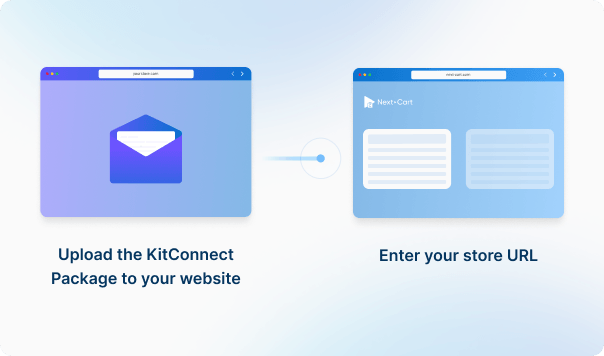
Enter your DJ-Catalog2 store URL, then download the KitConnect package, unzip it, and upload it to your DJ-Catalog2 website. 

What Can You Migrate from DJ-Catalog2 to Shift4Shop?

Review supported data, source-to-target mappings and any listed conditions. Custom fields, plugin data and URL redirects may need additional review.
Products
Product Categories
All relationships (categories, variants, images, etc.) preserved

Customize your setup with additional options

Recent Data Migration
Clear Target Store Data
Strip HTML Tags from Category and Product Names
Compatibility Overview
DJ-Catalog2DJ-Catalog2
Shift4ShopShift4Shop
Version Range
6.0.4 (and all previous releases)
26.x and all earlier versions
Main Editions
DJ-Catalog2 extension
Shift4Shop Online Store
Product Types: Simple Product, Variable Product, Virtual Product
Product Information: Name, SKU
Product Pricing : Regular Price, Sale Price, Tier Price
Product Images: Main image, Gallery Images, Images in Description
Product Inventory : Manage Inventory, Stock Status
External Links / Relationships : Categories
Product Attributes & Custom Fields : Attribute Value, Attribute Types
Product SEO / Structured Data: Meta Title, Meta Description, URL Path
Category Information: Name, Description, Status, Meta Title, Meta Description
Category Images: Alt Text
Category Structure / Hierarchy: Parent Category, Subcategories, Sort Order
DJ-Catalog2DJ-Catalog2
Shift4ShopShift4Shop
Product Types
Simple Product
Product
Variable Product
Product Variants
Virtual Product
Digital Product
Name
Name
SKU
SKU
Regular Price
Price
Sale Price
Sale Price
Tier Price
Tier Price
Main image
Default Image
Gallery Images
Additional Images
Images in Description
Description
Manage Inventory
Track Inventory
Stock Status
Stock
Categories
Categories
Attribute Value
Attribute Value
Attribute Types
Option Type
Meta Title
Meta Title
Meta Description
Meta Description
URL Path
SEO URL
Category Information
Name
Category Name
Description
Description
Status
Active
Meta Title
Meta Title
Meta Description
Meta Description
Alt Text
Alt Text
Parent Category
Parent Category
Subcategories
Subcategories
Sort Order
Sort Order

DJ-Catalog2 to Shift4Shop Migration Cost

Choose an available service: self-service Standard, expert-led Managed, or scoped Custom Migration. Enter your data volumes for an estimate; add-ons and custom requirements may affect the final price.
1. Service
2. Data Volume
Source Platform
DJ-Catalog2
Target Platform
Shift4Shop
Products
Customers
Orders
Blog posts
Custom jobs
+$100
ESTIMATED TOTAL ESTIMATED BASE PRICE
$0
Based on your selected service and data volume.
Standard Migration Source → Target
Migration Path
Source Platform ...
Target Platform ...
Data Volume
Total Data Records 0
Entity Points 0
Plan -
Service Standard Migration
0 0

Frequently Asked Questions

What you need to know before migrating your store data from DJ-Catalog2 to Shift4Shop.

Does Shift4Shop send out order confirmations to my customers?

If you are going to migrate orders to Shift4Shop, please go to Settings > Store Settings > Checkout and uncheck all settings inside the Order Notification section. It ensures no emails will be sent to your customers during the migration. Don't forget to turn on the notifications settings when the site goes live.


Start Your DJ-Catalog2 to Shift4Shop Migration Today!

Move your store from DJ-Catalog2 to Shift4Shop with a secure, guided migration tailored to your business.