
Migrate products, customers, orders, blog posts, and other supported store data from Adobe Commerce to WooCommerce securely and accurately while preserving data relationships throughout the transfer.
No downtime, No coding required
Keep your store active during migration. No technical skills needed.
Free Demo Available
Preview a sample of your WooCommerce data on Shopify before running the Full Migration.
1-year License with Recent Data Migration
Keep your migration project available for 12 months and sync new or changed data with Recent Data Migration when needed.
24/7 Technician Support
Get expert help with connections, configuration, migration issues, and validation whenever you need it.
Step-by-Step Guide to Adobe Commerce to WooCommerce Migration
1
Connect your Adobe Commerce store
Enter your Adobe Commerce store URL, then download the KitConnect package, unzip it, and upload it to your Adobe Commerce website.
2
Connect your WooCommerce store
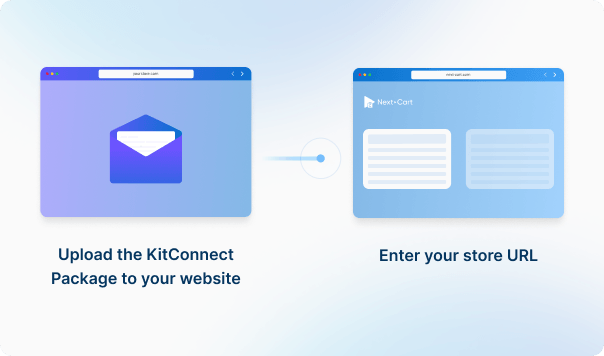
Upload the KitConnect package to your WooCommerce website, then enter your store URL to establish the connection. This allows the system to securely access your store data for migration.

3
Configure and start the migration
Enter your WooCommerce store URL in the Source Platform Setup form. Then, download the KitConnect package, unzip it, and upload it to the website root folder of your WooCommerce .
4
Review results & post-migration options
Enter your WooCommerce store URL in the Source Platform Setup form. Then, download the KitConnect package, unzip it, and upload it to the website root folder of your WooCommerce .
Data You Can Migrate
Products
Product Categories
Taxes
Manufacturers
Customers
Orders
Coupons
Reviews
Blog Posts
CMS Page
All relationships (categories, variants, images, etc.) preserved
Customize your setup with
additional options
Recent Data Migration
Clear Target Store Data
Strip HTML Tags from Category and Product Names
Transfer Embedded Images to Target Store
Create 301 Redirects for SEO URLs
Preserve Product IDs & Category IDs
Preserve Order IDs and Customer IDs
Compatibility Overview
Adobe Commerce
WooCommerce
Version Range
1.x – 2.4.9-alpha 3
10.4.0 - beta 2 (and all previous versions)
Special Variants
Multistore / Multisite
-
Language & Localization
Store Views (Multilingual, Multicurrency), RTL, Localized URLs
Multilingual, Multicurrency, RTL, Localized URLs powered by WPML and Polylang
Main Editions
Adobe Commerce On-premise Software, Adobe Commerce Cloud (PaaS), Adobe Commerce as a Cloud Service (SaaS), Adobe Commerce Optimizer
Customer Details: First Name, Last Name, Company, Street, City, Region, Country, Postcode, Telephone
Order Relationships: Customer ID, Items
Coupon Information: Code, Description, Discount Type, Type, Discount Amount, From Date, To Date
Usage Restrictions: Minimum Amount, Maximum Amount, Apply to Sale, Products, Excluded Products, Categories, Excluded Categories, Usage Limit, Uses Per Customer
Post Information: Title, Content, Short Description, Tags, URL Key, Status, Visibility
Post Images: Image, Gallery, Images In Content, Alt
Post Categories : Category, Parent, Position
Post SEO / Structure Data: Meta Title, Meta Description, URL Rewrite
Post Comments: Name, Email, Comment, Date, Status
Multi-language Post Information: Content, Short Description, Meta Title, Meta Description, URL Path
Page Information: ID, Title, Content, Content Heading, URL Key, Status, Visibility, Page Layout, Parent, Sort Order, Created At, Updated At
Page Images: Image, Images In Content, Alt
Page SEO / Structure Data: Meta Title, Meta Description, URL Rewrite
Multi-language Page Information : Title, Content, Excerpt, URL Path, Meta Title, Meta Description
Adobe Commerce
WooCommerce
Product Types
Simple Product
Simple Product
Configurable Product
Variable Product
Grouped Product
Grouped Product
Bundle Product
Product Bundles
Virtual Product
Virtual Product
Downloadable Product
Product Information
SKU
SKU
Description
Description
Weight
Weight
Length / Width / Height
Tags
Tags
URL Key
Slug
Enable / Disable
Published
Visibility
Catalog visibility
Product Pricing
Price
Regular Price
Special Price
Sale Price
Tier Price
Sale Price
Product Options
Name
Attribute
Attribute
Attribute
Attribute Option
Attribute Value
Stock per option
Stock (Variation)
Qty (Simple Product)
Stock (Variation)
Swatch options
Color Swatch (plugin/theme)
Visual Swatch/ Text Swatch
Color Swatch (plugin/theme)
Position
Menu Order
Input Type
Product Attribute Type
Product Variants
Variant Attributes
Attribute (Used for Variations)
Price
Regular Price / Sale Price
Weight
Weight
Dimensions
Length / Width / Height
Stock quantity
Stock Quantity
Quantity
Stock Quantity
Image
Image
Status
Status
Product Images
Main image
Product Image
Base Image
Product Image
Gallery Images
Product Gallery
Additional Images
Product Gallery
Variant Images
Variant Images
Alt Text
Alt Text
Position
Menu Order
Images in Description
Description
HTML Editor
Description
Product Inventory
Manage Inventory
Manage Stock
Manage Stock
Manage Stock
Quantity
Stock quantity
Stock Status
Stock Status
Backorders Allowed
Allow Backorders
Backorders
Allow Backorders
External Links / Relationships
Categories
Categories
Related Products
Linked Products
Associated Products
Linked Products
Up-sells
Up-sells
Cross-sells
Cross-sells
Product Attributes & Custom Fields
Name
Terms
Attribute Code
Name
Values
Terms
Position
Menu Order
Visible On Product Page
Visible on Storefront
Visible On Product Page
Attribute Types
Type
Input Type
Type
Attribute Swatches
Swatch (Plugin)
Visual Swatch
Swatch (Plugin)
Product Downloads
File name
File name
Title
File name
File URL
File URL
File
File URL
Download Limit
Download Limit
Maximum Downloads
Download Limit
Download Expiry
Download Expiry
Expiration
Download Expiry
Downloadable File
Downloadable Product
Multi-language Product Information
Name
Name
Description
Description
Short Description
Short Description
Attributes
Attributes
Product SEO / Structured Data
Meta Title
Meta Title
Meta Description
Meta Description
Redirect Rules
Redirect
301 Redirect
Redirect
URL Rewrite
Redirect
Meta Keywords
Redirect
URL Path
Slug
URL Key
Slug
Category Information
Name
Name
URL Key
Slug
Description
Description
Is Active
Published
URL Rewrite
Redirect
Meta Title
Meta Title
Meta Description
Meta Description
Category Images
Image
Thumbnail
Alt Text
Alt Text
Category Structure / Hierarchy
Parent Category
Parent Category
Subcategories
Subcategories
Position
Menu Order
Multi-language Category Information
Name
Name
Description
Description
Meta Title
Meta Title
Meta Description
Meta Description
URL Path
URL Path
Tax Rules
Tax Rule
Tax Rate
Tax Class
Tax Class
Country
Country
State
State
Zip / Post Code
Postcode
Rate
Rate
Apply to Shipping
Tax Shipping
SKU
Product
Manufacturer Information
ID
ID
Name
Name
URL Key
Slug
Description
Description
Manufacturer Branding
Image
Image
Alt
Alt
Manufacturer SEO
Meta Title
Meta Title
Meta Description
Meta Description
Customer Information
First Name
First Name
Last Name
Last Name
Email
Email
Telephone
Phone
Status
Status
Created At
Registered Date
Password Hash
Password
bcrypt
bcrypt
Customer Addresses
ID
ID
First Name
First Name
Last Name
Last Name
Company
Company
Address 1
Address 1
Street
Address 1
Address 2
Address 2
City
City
Region
State
Country
Country
Postcode
Postcode
Telephone
Phone
Billing / Shipping
Billing / Shipping
Default Billing
Billing / Shipping
Default Shipping
Billing / Shipping
Customer Order History
Order ID List
Orders
Orders
Orders
Order Information
Entity ID
ID
Increment ID
Number
Status
Status
Order Currency
Currency
Subtotal
Subtotal
Discount
Discount
Tax Amount
Tax
Grand Total
Total
Payment Method
Payment Method
Shipping Description
Shipping Method
Shipping Amount
Shipping Method
Tracking Number
Tracking
Comments
Customer Note
Created At
Created Date
Updated At
Date Modified
Product Details
Name
Name
SKU
SKU
Qty Ordered
Quantity
Price
Price
Row Total
Total
Tax Amount
Tax
Discount Amount
Discount
Product Options
Variation
Customer Details
First Name
First Name
Last Name
Last Name
Company
Company
Street
Address 1
City
City
Region
State
Country
Country
Postcode
Postcode
Telephone
Phone
Order Relationships
Customer ID
Customer ID
Items
Line Items
Coupon Information
Code
Code
Description
Description
Discount Type
Discount Type
Type
Discount Type
Discount Amount
Coupon Amount
From Date
Date Created
To Date
Date Expires
Usage Restrictions
Minimum Amount
Minimum Spend
Maximum Amount
Maximum Spend
Apply to Sale
Exclude Sale
Products
Products
Excluded Products
Excluded Products
Categories
Categories
Excluded Categories
Excluded Categories
Usage Limit
Usage Limit
Uses Per Customer
Usage Per User
Multi-language Coupon Information
Name
Name
Description
Description
Review Information
Title
Title
Detail
Comment
Rating
Rating
Status
Approved
Created At
Date
Reviewer Information
Customer ID
Customer ID
Email
Email
Nickname
Name
Verified Purchase
Verified Purchase
Product Relationship
Entity ID
Product ID
Child SKU
Variation ID
Post Information
Title
Title
Content
Content
Short Description
Excerpt
Tags
Tags
URL Key
Slug
Status
Status
Visibility
Visibility
Post Images
Image
Featured Image
Gallery
Gallery
Images In Content
Images In Content
Alt
Alt
Post Categories
Category
Category
Parent
Category
Position
Menu Order
Post SEO / Structure Data
Meta Title
Meta Title
Meta Description
Meta Description
URL Rewrite
Redirect
Post Comments
Name
Name
Email
Email
Comment
Comment
Date
Date
Status
Status
Multi-language Post Information
Content
Content
Short Description
Short Description
Meta Title
Meta Title
Meta Description
Meta Description
URL Path
URL Path
Page Information
ID
ID
Title
Title
Content
Content
Content Heading
Excerpt
URL Key
Slug
Status
Status
Visibility
Visibility
Page Layout
Template
Parent
Parent
Sort Order
Menu Order
Created At
Created
Updated At
Updated
Page Images
Image
Featured Image
Images In Content
Images In Content
Alt
Alt
Page SEO / Structure Data
Meta Title
Meta Title
Meta Description
Meta Description
URL Rewrite
Redirect
Multi-language Page Information
Title
Title
Content
Content
Excerpt
Excerpt
URL Path
URL Path
Meta Title
Meta Title
Meta Description
Meta Description
Estimate your Migration Cost
A clear, step-by-step workflow where our technicians handle everything. You only review the final result—we take care of the rest.
1. Service
2. Data Volume
Source Platform
Adobe Commerce
Target Platform
WooCommerce
Products
Customers
Orders
Blog posts
Custom jobs
+$100
2. Add-ons (optional)
ESTIMATED TOTAL
ESTIMATED BASE PRICE
$0
Pricing includes AWS architectural fees.

Standard MigrationSource → Target
Migration Path
Source Platform...

Target Platform...
Data Volume
Total Data Records0
Entity Points
0
Plan-
Extension
ServiceStandard Migration
Add-ons
00
Frequently Asked
Questions
What should I test in Demo Migration before a WooCommerce Full Migration?
Test both simple and variable products, especially parent-child variation relationships, SKUs, prices, images, stock, categories, tags, and attributes. Also review representative customers, orders, important pages and URLs, plus any plugin/custom data that is business-critical. If these samples cannot be explained correctly, refine the scope before Full Migration.


Can Next-Cart migrate WooCommerce plugin data and custom fields?
Supported standard fields can migrate normally, and Add-ons can handle bounded needs such as filtering records, transforming field values, or remapping supported fields. Plugin-owned records, custom tables, unsupported structures, or plugin-specific business logic may need Custom Service. Installing or configuring the plugin itself is separate from migrating its data unless explicitly included.
When does a WooCommerce migration need more than Standard Service?
Standard Service can be enough when products, variations, customers, orders, coupons, categories, tags, media, CMS Pages, Blog Posts, and URLs are structurally clear. Custom Service review is more likely when the store depends on subscriptions, bookings, memberships, wholesale rules, custom checkout fields, HPOS-sensitive metadata, plugin-owned records, custom tables, or external-system references.
Start your Adobe Commerce to WooCommerce Migration today!
Move your store from Adobe Commerce to WooCommerce with a secure, guided migration tailored to your business.