Next-Cart

CSV to Zen Cart Import

Import products, customers, orders, blog posts, and other supported store data from CSV to Zen Cart securely and accurately while preserving data relationships throughout the transfer.
No Downtime,
No Coding Required
Keep your store running during migration. No coding or technical skills required.
Free Demo Available
Preview a sample of your data in the target store before starting the full migration.
1-Year License with
Recent Data Migration
Keep your migration available for 12 months and migrate new or updated data with Recent Data Migration when needed.
Expert Technician Support
Get expert help with connections, configuration, migration issues, and data validation throughout your migration.

How to Migrate CSV to Zen Cart

Connect the source and target, choose the supported data and options, and review the results. The steps below describe the tool workflow; expert-led and custom projects may follow an agreed plan.
Connect your Custom Platform
Connect your Zen Cart store
Configure and start the migration
Review results & post-migration options
1
Connect your Custom Platform

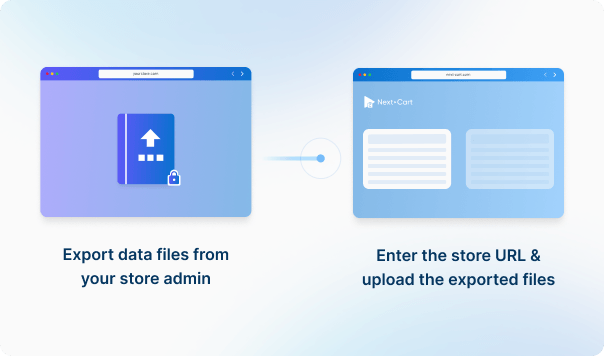
Upload the required data files to establish the connection. 

What Can You Migrate from CSV to Zen Cart?

Review supported data, source-to-target mappings and any listed conditions. Custom fields, plugin data and URL redirects may need additional review.
Products
Product Categories
Taxes
Manufacturers
Customers
Orders
Coupons
Reviews
Blog Posts
CMS Page
All relationships (categories, variants, images, etc.) preserved

Customize your setup with additional options

Recent Data Migration
Clear Target Store Data
Strip HTML Tags from Category and Product Names
Transfer Embedded Images to Target Store
Create 301 Redirects for SEO URLs
Preserve Product IDs & Category IDs
Preserve Order IDs and Customer IDs
Compatibility Overview
CSVCSV
Zen CartZen Cart
Version Range
-
1.x – 2.2.0 (and all previous 2.x releases)
Language & Localization
-
Multilingual, Multicurrency, RTL, Localized URLs
Main Editions
-
Zen Cart Online Store
Product Types: Simple Product
Product Information: Name, SKU, Barcode, Brand, Status
Product Pricing : Regular Price, Sale Price, Tier Price
Product Options: Name, Stock per option, Type
Product Variants : Variant Attributes, Weight, Stock Quantity, Status
Product Images: Main image, Gallery Images
Product Inventory : Manage Inventory, Stock Status
External Links / Relationships : Categories, Manufacturers
Product Attributes & Custom Fields : Attribute Value, Attribute Types
Product SEO / Structured Data: Meta Title, Meta Description, Meta Keywords
Category Information: Name, Description, Status, Meta Title, Meta Description
Category Structure / Hierarchy: Parent Category, Subcategories
Tax Rules: Tax Rule, Country, State, Rate percent
Manufacturer Information: ID, Name, Description
Manufacturer Branding : Logo Image
Customer Information : First Name, Last Name, Email, Phone, Status, Date Created
Customer Addresses: ID, First Name, Last Name, Company, Address 1, Address 2, City, Province, Country, Zip Code, Phone
Order Information: Number, Status, Currency, Subtotal, Discount, Tax, Total, Payment Method, Shipping Method, Shipping, Note, Created Date
Product Details: Product Name, SKU, Quantity, Unit Price, Line Total, Tax, Discount, Options
Customer Details: First Name, Last Name, Company, Street, City, Province, Country, Postcode, Phone
Order Relationships: Linked Customer, Linked Products
Coupon Information: Code, Description, Discount Type, Discount Value, Status, Start Date, End Date
Usage Restrictions: Minimum Spend, Products, Categories, Usage Limit
Review Information: Title, Comment, Rating, Status, Date
Reviewer Information: Email, Name
Product Relationship: Product ID
Post Information: Title, Content, Status
Post Categories : Category
Post SEO / Structure Data: Meta Title, Meta Description
Post Comments: Name, Email, Comment, Date
Page Information: ID, Title, Content, Status, Created Date, Updated Date
Page SEO / Structure Data: Meta Title, Meta Description
CSVCSV
Zen CartZen Cart
Product Types
Simple Product
Simple Product
Name
Name
SKU
Model
Barcode
UPC
Brand
Manufacturer
Status
Status
Regular Price
Price
Sale Price
Special Price
Tier Price
Quantity Discounts
Name
Option
Stock per option
Attribute Stock
Type
Option Type
Variant Attributes
Attribute
Weight
Weight
Stock Quantity
Quantity
Status
Status
Main image
Product Image
Gallery Images
Additional Images
Manage Inventory
Track Stock
Stock Status
Stock Status
Categories
Categories
Manufacturers
Manufacturers
Attribute Value
Attribute Value
Attribute Types
Option Type
Meta Title
Meta Title
Meta Description
Meta Description
Meta Keywords
Meta Keywords
Category Information
Name
Name
Description
Description
Status
Status
Meta Title
Meta Title
Meta Description
Meta Description
Parent Category
Parent Category
Subcategories
Subcategories
Tax Rules
Tax Rule
Tax Rule
Country
Country
State
State
Rate percent
Rate
Manufacturer Information
ID
ID
Name
Name
Description
Description
Logo Image
Image
Customer Information
First Name
First Name
Last Name
Last Name
Email
Email
Phone
Phone
Status
Status
Date Created
Date Created
ID
ID
First Name
First Name
Last Name
Last Name
Company
Company
Address 1
Address
Address 2
Address 2
City
City
Province
State
Country
Country
Zip Code
Zip
Phone
Phone
Order Information
Number
Order ID
Status
Status
Currency
Currency
Subtotal
Subtotal
Discount
Discount
Tax
Tax
Total
Total
Payment Method
Payment
Shipping Method
Shipping
Shipping
Shipping
Note
Comments
Created Date
Date Created
Product Name
Product Name
SKU
Model
Quantity
Quantity
Unit Price
Price
Line Total
Price
Tax
Tax
Discount
Discount
Options
Attributes
First Name
First Name
Last Name
Last Name
Company
Company
Street
Address
City
City
Province
State
Country
Country
Postcode
Zip
Phone
Phone
Linked Customer
Customer ID
Linked Products
Products
Coupon Information
Code
Code
Description
Description
Discount Type
Discount Type
Discount Value
Discount Amount
Status
Status
Start Date
Start Date
End Date
Date End
Minimum Spend
Minimum Order
Products
Products
Categories
Categories
Usage Limit
Usage Limit
Review Information
Title
Title
Comment
Review
Rating
Rating
Status
Status
Date
Date
Email
Email
Name
Name
Product ID
Product ID
Post Information
Title
Title
Content
Content
Status
Status
Category
Category
Meta Title
Meta Title
Meta Description
Meta Description
Name
Name
Email
Email
Comment
Comment
Date
Date
Page Information
ID
ID
Title
Title
Content
Content
Status
Status
Created Date
Created
Updated Date
Updated
Meta Title
Meta Title
Meta Description
Meta Description

CSV to Zen Cart Migration Cost

This migration requires Custom Migration. Enter your data volumes for an initial estimate; the final scope and price depend on a review of your requirements.
1. Service
CSV requires the Custom service.
2. Data Volume
Source Platform
CSV
Target Platform
Zen Cart
Products
Customers
Orders
Blog posts
Custom jobs
+$100
ESTIMATED TOTAL ESTIMATED BASE PRICE
$0
Based on your selected service and data volume.
Standard Migration Source → Target
Migration Path
Source Platform ...
Target Platform ...
Data Volume
Total Data Records 0
Entity Points 0
Plan -
Service Standard Migration
0 0

Frequently Asked Questions

What you need to know before migrating your store data from CSV to Zen Cart.

Why is only one product image displayed after migration to Zen Cart?

In Zen Cart, when a product has multiple images, the images are typically named according to the following format: [name]_[position].[extension]. For example, for a product with three images named "shirt.jpg", the images would be:

  • "shirt.jpg" (main image)
  • "shirt_1.jpg" (second image)
  • "shirt_2.jpg" (third image)

Our migration tool is designed to upload images to Zen Cart following this naming convention. However, if your Zen Cart website has been customized to allow flexible image naming, the storefront may only display the main image, even though all images were uploaded. This happens because the customized settings on your Zen Cart may not recognize or display the additional images correctly.

If your Zen Cart store has been customized in this way, we can modify the migration tool to work with your setup. Let us know, and we’ll make the necessary adjustments.


Start Your CSV to Zen Cart Migration Today!

Move your store from CSV to Zen Cart with a secure, guided migration tailored to your business.