Start Your Drupal to OpenCart Migration Today!
Move your store from Drupal to OpenCart with a secure, guided migration tailored to your business.


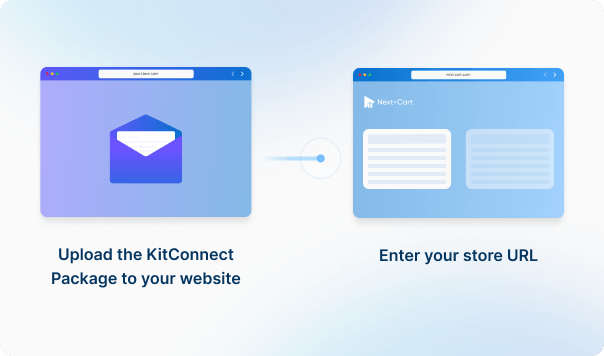
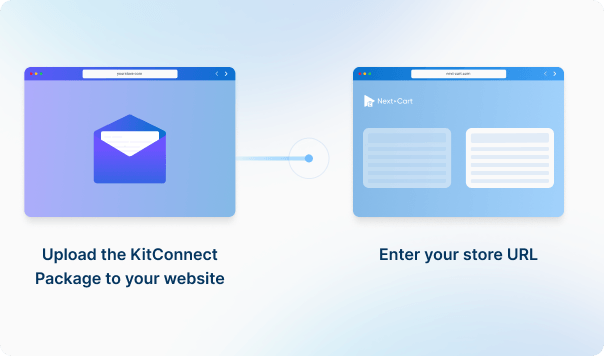


Enter the URL of the Drupal site you are migrating from. Then download the KitConnect package, unzip it, and upload it to that site.
Enter the URL of the OpenCart store you are migrating to. Then download the KitConnect package, unzip it, and upload it to that store’s website.



 Drupal
 OpenCartDrupalOpenCart


These four data types are used to estimate the price. Other supported data, including categories, coupons, and reviews, is also migrated at no extra charge.
You can increase your plan’s data limit, upgrade your service, or add custom work while your license is valid.
You only pay the price difference, and your license expiry date stays the same. Custom work is reviewed and quoted separately.
Learn about upgrades (Opens in a new tab)Select the connector that matches the commerce module, not just the site's CMS. The Drupal connection looks for Drupal Commerce products and warns when it finds Ubercart instead. Confirm the module and version before testing custom fields, product variations and order data.
The default import fills product descriptions for unmapped destination languages with the default product content. This is a fallback copy, not a translation. Create and map the intended languages first, then check that untranslated content has not appeared in a language-specific storefront.
For OpenCart 3, Next-Cart maps the store assignments supplied by the source. Unmapped assignments can fall back to store 0. In imports from another platform without source store assignments, it uses the first configured mapping or store 0. Confirm the mapping and inspect product availability in each intended storefront.
Not with the current Drupal 8-and-newer connection. It takes the product SKU and base price from one variant, but does not transfer the full variant list. The exported stock quantity is zero and stock tracking is off. If you need multiple variants or inventory from a stock module, agree how those records will be transferred before migration. Changing field mappings alone does not add the missing records.
When variants are converted into product options, Next-Cart adds together the stock of the variants that share each option value. For example, M–Red with 5 units and M–Black with 10 units give Size M a quantity of 15. If the variants do not manage stock, the option values use the main product’s quantity instead.
This preserves quantities for individual choices, not a separate stock record for every original combination. Do not add the totals for Size and Color together: they describe the same inventory. Combination-specific SKUs and prices are not generally retained by this conversion. This applies to the OpenCart 1.5, 2, 3 and 4 connections; ordinary source options are handled separately.
The OpenCart 4 import rebuilds supplied related-product references using the migrated product IDs and writes links in both directions. The OpenCart 4-to-OpenCart 4 connection also handles these mappings. Include the referenced products and check the final selections. This answer concerns related-product links, not separate cross-sell or up-sell extensions.
For OpenCart 1.5–4, Next-Cart copies the main image and gallery to the new store. Supported option-value images are handled separately. A gallery for a source variant does not automatically become a gallery for every combination of OpenCart options. Test products with different option pictures, especially when the source uses an image extension. Images inside descriptions require the separate copying option where available; check their links before removing the old hosting.
Customers can keep their passwords if Drupal supplies compatible stored login data and the matching Customer Password Plugin supports both platform versions.
The covered target versions are OpenCart 1.5, 2, 3 and 4. Obtain and verify the exact compatible plugin; OpenCart 1.4 is not covered. This refers to the Drupal Commerce connection for Drupal 7/8; confirm the actual source version. Install the compatible plugin and test migrated accounts before customers sign in. Accounts without compatible login data need a password reset or activation.
For migrations that include customer accounts, check whether the source provides usable password-verification data and whether the matching Customer Password Plugin supports both versions. Customer names and email addresses alone are not enough to retain existing passwords. Review the FAQ for your exact source-to-OpenCart pair, install any required compatible plugin before customers sign in, and test migrated accounts. Prepare password resets or activation for accounts whose credentials cannot be used.
Yes. The default import limits product names and SEO title, description and keyword fields to 255 characters before writing them. Review long names and SEO text in the test results and shorten them deliberately if important wording would otherwise be cut.
In the reviewed OpenCart 3 update connection, selecting quantity updates the mapped main product’s quantity, not the quantities stored for its option values. It does not repeat the variant-to-option stock aggregation used during the initial migration.
Data Update is a paid add-on for selected fields of records linked to the previous migration. Keep those links, continue that migration and leave target-data clearing off. Changes to option-level stock or product combinations need a separately confirmed update method; a successful product-quantity update does not confirm that those details were refreshed. A compatible source connection and the selected update fields are required.
Available services depend on your migration path. Standard Migration lets you use the tool yourself with technical support. With Managed Migration, our technicians carry out the agreed migration. Custom Migration covers tailored requirements, with the migration carried out by you or our team as agreed. Data types must be supported by both connections; choosing expert handling does not by itself add unsupported data.
Where a self-service Demo Migration is available for your migration path, you can try it for free before purchasing. It transfers a small sample of supported data so you can check the result. Add-ons and custom work are not included in the self-service demo. For a file-based, custom or technician-assisted evaluation, contact us first to agree the test scope and any applicable cost.
Your data types and quantities determine the Entity Points total and the plan you need. The cost also depends on your chosen service, add-ons, and any custom work. Use the pricing calculator for an estimate; custom work is reviewed and quoted separately.
If you are migrating from a live store, it can normally keep taking orders while Next-Cart copies its data. The migration does not delete or change the source data. Plan the final update and the switch to the new store separately so recent orders and other changes are included. For file-based migrations, changes made after an export require a fresh export; an uploaded file is not a live connection to the store.
Yes. Your license allows repeat runs for the same store and migration path for 12 months from purchase, within your plan’s data limit. Continuing the previous migration can add eligible new records without importing the same mapped records again.
Changing records already migrated is separate: the paid Data Update add-on can update selected fields where your source, target version and those fields are supported. Keep the existing migration links and leave target-data clearing off. It does not automatically update every field or provide continuous synchronization.
Yes. While your license is valid, you can increase your plan’s data limit and upgrade to a higher service where it is available for your migration path. You can move from Standard Migration to Managed Migration or Custom Migration, or from Managed Migration to Custom Migration.
If you already use Custom Migration, you can add custom work after a review and quote. You pay only the additional amount, and your license expiry date stays the same.


Move your store from Drupal to OpenCart with a secure, guided migration tailored to your business.