
- Does “moving your data” keep you up at night?
- Step 1: Catalog audit (pruning the overgrowth)
- Step 2: Customer data sanitization
- Step 3: Standardizing categories and tags
- Step 4: Media and asset optimization
- Step 5: The ultimate pre-migration backup (Your safety net)
- How Next-Cart makes moving your data stress-free
- In Summary,
Does “moving your data” keep you up at night?
The phrase “moving your data” carries a bit of dread for many eCommerce store owners. What if product data disappears? What if customer records are incomplete? Or what if years of order history vanish?
These concerns are not unfounded. When migrating data without a clear plan, you risk broken links, missing images, duplicated entries, or fragmented customer insights. Because of these fears, many merchants postpone the process, even though they know their current platform is holding them back in the market.
But in fact, the longer the delay, the more complex the data, and the more intimidating the move feels.
Here’s the truth: moving your data doesn’t have to be a nightmare. In contrast, it can become far more valuable – a chance to refine your store on a stronger foundation.
This is where the principle of “Garbage In, Garbage Out” comes into play. Your existing store might contain outdated, inconsistent, or redundant data. Simply transferring it to a new platform will replicate those issues. Instead, successful migration treats it as a digital spring-cleaning, improving and curating your current data.
Let’s walk through the five essential steps that make a migration a strategic advantage with confidence.
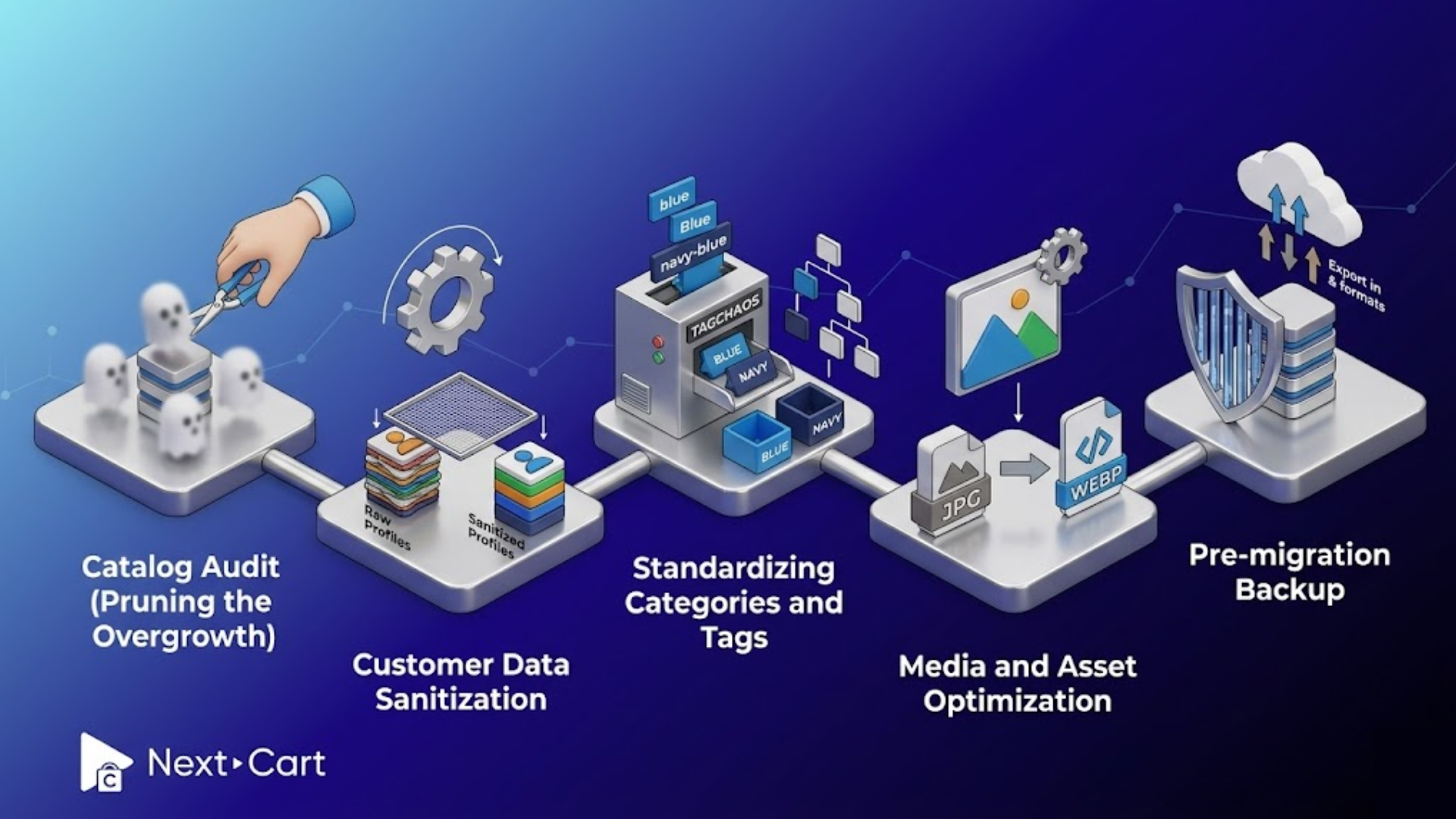
Step 1: Catalog audit (pruning the overgrowth)
Long-running eCommerce stores often accumulate clutter in their catalog. Some products may sit untouched for years. Seasonal items linger after their relevance. Variants multiply, and duplicates appear. Your catalog becomes much more complex than it should be.
The first step before moving your data is to evaluate your product catalog, clean any clutter, and decide how your new store will perform.
Start by identifying “ghost products.” These are items that haven’t sold for months, if not years, and are unlikely to sell again. They are kept “just in case.” But these inactive products often do more harm than good. They clutter navigation, dilute analytics, and also increase migration costs. Removing or archiving them helps sharpen your catalog.
Next, look for duplicate SKUs or overlapping product entries. They often arise over time as teams expand. If left unsolved, these duplicates can create confusion in inventory tracking and affect customer experience.
While auditing your catalog, revisit the product descriptions, pricing logic, and variant structures to verify that your attributes are consistent across similar items and that naming conventions are aligned.
The 80/20 rule can bring clarity to this process. In most stores, a small percentage of products generate the majority of revenue. Identifying and prioritizing these high-performing items will help you focus on what truly drives your business. Meanwhile, less relevant products can be restructured or excluded altogether during the migration.
In short, pruning your catalog is about refining it. A leaner catalog will lead to faster migration, lower costs, and better user experience.
Step 2: Customer data sanitization
If your product catalog is the face of your business, your customer data is its memory. This memory system can become cluttered and unreliable over time due to duplicate accounts, bot-generated profiles, and outdated contacts. While these issues may not seem urgent, they can significantly impact your store’s performance after migration.
Cleaning customer data is a critical step before moving it to the new platform, and it requires precision.
Begin by resolving duplicate profiles. A single customer might appear multiple times due to their variations in email addresses, guest checkouts, or different sign-up channels. Consolidate these records in your CRM to save storage and improve CRM accuracy. This is also essential in marketing strategies relating to personalization and retention.
Next, filter out bot accounts and spam entries that are often created via unsecured forms or outdated integrations. These can inflate your customer database. Removing them helps reduce storage requirements and ensures that analytics and campaign metrics are based on real users.
Standardizing contact information is another key step of this process. Phone numbers, addresses, and naming formats should follow consistent rules.
Beyond cleaning, segment your customers before migration to boost your first marketing campaign on the new platform. Before moving your data, group your customers into specific segments, such as repeat buyers, high-value customers, inactive users, or recent subscribers. Then, you can launch your new store with targeted campaigns ready to go.
When customer data is clean, structured, and segmented, it becomes a powerful database for growth.
Step 3: Standardizing categories and tags
Behind every seamless shopping experience is a well-organized structure of categories and tags. Yet, in many stores, this structure evolves over time without clear rules.
The result is what many merchants call “tag chaos.” For example, variations like “blue,” “Blue,” and “navy-blue” coexist without standardization. Or categories may overlap or lack a logical hierarchy. These issues compound into significant usability and SEO challenges.
When moving your data, this is your opportunity to rebuild the taxonomy.
Start by auditing your existing tags. Identify duplicates, inconsistencies, and outdated labels. Then, establish a clear naming convention based on how customers actually search and browse. Consistency here improves internal functionality and search engine indexing.
Next, evaluate your category structure. Is it easy to navigate? Does it reflect how customers think? A well-designed category should guide users intuitively from broad groupings to specific products. This is also the moment to consider AI-driven search and recommendation engines. Clean, well-structured categories and tags make it easier for these systems to deliver relevant results to users.
As you prepare for migration, map each existing category and tag to a defined destination in the new system. This step helps prevent broken navigation paths. At the same time, customers will feel a sense of continuity when they return to your store.
Standardization is one of the most impactful parts of moving your data, laying the groundwork for a store that is easier to manage and more intuitive for customers.
Step 4: Media and asset optimization
Customers experience your products mainly via images, videos, and other media assets. During migration planning, it is essential to audit your media library. Identify any broken image links, missing files, or duplicated assets. If these problems are carried over, they will affect both the appearance and functionality of the new store.
Alt-text is an important consideration, yet it is often neglected. Ensure that all of your images have clear, descriptive alt-text before migration. It plays a key role in accessibility and search engine optimization.
In addition, optimizing file size can deliver an immediate impact. Large, uncompressed images can significantly slow down your website. The migration is an ideal event to transition to modern formats like WebP, which offer high-quality visuals at smaller file sizes.
It is also recommended to keep consistent naming conventions and folder structures. Then, it will be easier to manage assets at scale as your catalog grows.
In this step, the more complex aspect is to maintain the relationship between products and their associated media. Each image must remain correctly linked to its corresponding product, variant, or category. The right migration tool, like Next-Cart, preserves this relationship automatically.
In this case, optimizing your media before the migration can help improve speed, clarity, and overall user experience.
Step 5: The ultimate pre-migration backup (Your safety net)
Remember that you never begin moving your data without a complete backup. A backup is your safety net, keeping data intact and recoverable. Therefore, it provides the confidence to move forward.
The best practice is to export your database in multiple formats, such as CSV, XML, or SQL. Each format offers different advantages for readability, flexibility, or system compatibility. Then, you’re prepared for various scenarios during verification or recovery.
But simply having a file is not enough – you need to test the backups to ensure that they can be restored correctly. And creating a data dictionary adds another layer of control. This document outlines what data exists, how it is structured, and where it will be mapped. It serves as a reference point for tracking progress and validating results.
Backups are not just about protection, but they are also about clarity and control. With a solid fallback, moving your data is a calculated process rather than a risk.
How Next-Cart makes moving your data stress-free
For many merchants, the technical complexity of migration can feel overwhelming. Data structures differ between platforms, or dependencies can be difficult to track.
That’s why you need to cooperate with the right partner. With Next-Cart, we will approach the move of your data as both a technical and strategic process. Instead of a one-size-fits-all migration, flexible tools are applied to your specific project.
Filtering capabilities are a valuable feature. Rather than transferring everything by default, you can exclude specific products or old orders. As a result, your new store starts clean, focused, and optimized from day one after the migration.
Mapping customization is another. Each platform has its own data structure, which can lead to errors. Flexible mapping tools can adjust how your data is translated during migration and align it with your new system’s requirements.
Beyond the tools, humans play a crucial role. Next-Cart’s technical support team has experience in handling complex migrations across various platforms. They understand the nuances and anticipate potential issues along the way.
This means you don’t have to navigate the process alone. While your data is handled with care and precision, you can focus on preparing your business for the next stage.
In Summary,
The migration is a great opportunity to create a cleaner, more scalable foundation for your business. It is time to audit your catalog, sanitize customer data, standardize your structure, optimize your media, and secure your backups. Each step reduces risk during migration and adds value to your new store.
The fear of migration often comes from uncertainty. But with the right preparation and the right technical support, that uncertainty can be replaced with confidence, and even excitement.
A clean migration sets the stage for better performance and more effective marketing. It’s the beginning of a new chapter, built on data you can trust.