
A WooCommerce store that loaded instantly a year ago now struggles to keep up with customer demand: its product pages take longer to generate, the admin dashboard is sluggish, and the checkout pages feel much slower. Then, many store owners decide to upgrade hosting resources or add more RAM, investing in better infrastructure, yet performance issues often persist.
However, the root cause frequently lies within the store’s database. Over time, a WooCommerce database accumulates unnecessary information, creating a bloated Database Schema that becomes difficult for the system to manage, like a warehouse packed with obsolete inventory. In these stores, outdated records, expired sessions, and leftover plugin data occupy space and consume resources.
As online stores grow, effective Data Cleansing is essential for improving backend performance and Customer Experience (CX), especially during checkout. Let’s understand how database bloat develops and how safely eliminating it helps store owners restore performance and prepare their business for future growth.
- Understanding WooCommerce database bloat
- Post revisions – The silent storage consumer
- Expired transients and cached data
- Abandoned cart sessions
- Plugin residue and orphaned tables
- The hidden business cost of database lag
- A practical Data Cleansing protocol for WooCommerce stores
- Step 1: Remove expired transients
- Step 2: Clean post revisions
- Step 3: Purge expired sessions
- Step 4: Review plugin-generated tables
- Step 5: Archive older order data
- Step 6: Clean log files and debug records
- Building a sustainable database maintenance strategy
- How Next-Cart optimizes your WooCommerce transition
- In conclusion
Understanding WooCommerce database bloat
WooCommerce relies on WordPress databases to store products, customer accounts, settings, orders, sessions, and plugin configurations. In this system, every customer interaction generates additional records; every plugin installation creates new tables; and every modification and transaction contributes more data. As a result, after years of operation, many databases become overloaded.
Post revisions – The silent storage consumer
WordPress automatically creates revisions whenever content is updated, generating dozens or hundreds of revisions for product descriptions, blog articles, landing pages, and store policies over time.
Revision history can be useful for recovering previous versions, but most stores never need those accumulated changes. These records remain stored, increasing table sizes, consuming database resources, and slowing database queries.
Expired transients and cached data
Transients are temporary pieces of data stored by WordPress and WooCommerce to improve performance, such as cached product information, shipping calculations, API responses, and promotional data.
The problem arises when transients expire but are not removed. Many plugins even create thousands of temporary records that remain inside the database. This finally makes database lookups less efficient.
Many established stores have a significant percentage of their database consisting of expired transient entries with no active functionality.
Abandoned cart sessions
WooCommerce stores customer session data to support shopping carts, checkout progress, and browsing behavior. However, abandoned carts and expired sessions frequently remain in the database long after customers leave the site.
With high traffic, many stores experience these session records growing rapidly, adding weight to the database and creating additional overhead during data retrieval.
Plugin residue and orphaned tables
One of the most overlooked causes of database bloat comes from plugins. Many WordPress plugins create custom database tables during installation that persist even after the plugins are uninstalled. Also, over years, a WooCommerce store may cycle through dozens of plugins for SEO, marketing automation, shipping management, analytics, reviews, and loyalty programs.
These remaining tables are embedded within the Database Schema, and database engines must navigate this unnecessary structure, consuming more resources and slowing SQL query execution.
The hidden business cost of database lag
Many merchants underestimate the financial consequences of database inefficiencies. In reality, they can directly impact revenue throughout the customer journey.
Checkout performance and Customer Experience
The checkout page is among the most important pages in any eCommerce store. When customers arrive at checkout, they have already completed the hardest part of the buying process, including discovering products, comparing options, and making purchasing decisions.
At this stage, delays become particularly dangerous. It is when database queries take longer to process shipping calculations, tax estimates, coupon validations, or payment requests. Then, customers experience loading spinners, delayed responses, or page refreshes.
Research consistently shows that online shoppers have little patience for slow websites, and an unreliable checkout process can quickly lead to abandoned carts.
Reduced operational efficiency
Employees may experience delays when updating inventory, processing orders, generating reports, or managing customer records. Over time, these administrative inefficiencies reduce productivity and increase operational costs.
As databases grow larger, routine maintenance tasks also require more resources and create extra strain on hosting environments.
SEO and search visibility
Bloated databases slow page generation and make site speed metrics deteriorate. As a consequence, product pages take longer to load, category pages become less responsive, and Core Web Vitals scores also suffer.
As search engines prioritize user-friendly experiences, slow pages may struggle to compete against faster competitors, reducing their organic visibility. For WooCommerce businesses relying on organic traffic, database optimization becomes an important component of long-term SEO strategy.
A practical Data Cleansing protocol for WooCommerce stores
Fortunately, database bloat can be addressed through Data Cleansing practices.
Before making any changes, however, it is always essential to create a complete database backup. A backup ensures that any accidental deletion can be reversed quickly.
Step 1: Remove expired transients
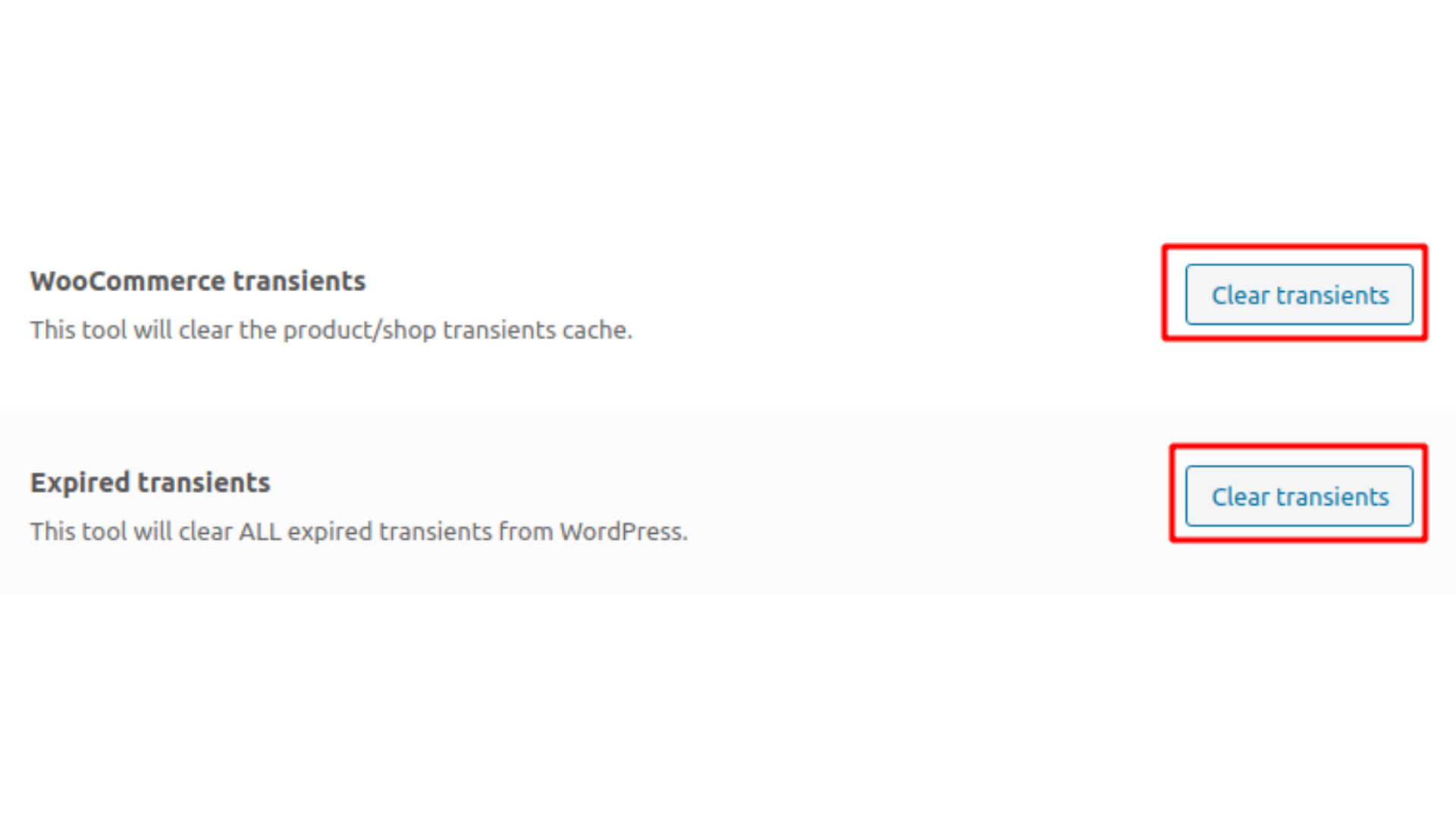
Source: https://conetix.com.au/support/clearing-woocommerce-transients/
Store owners can manually remove expired transient records using SQL commands or reputable optimization tools. Trusted optimization plugins can also provide automated transient cleanup features that identify and delete expired entries without affecting active store functionality.
Regular transient maintenance helps reduce clutter and improve query efficiency.
Step 2: Clean post revisions
For many stores with thousands of unnecessary historical revisions, removing them can significantly reduce database size.
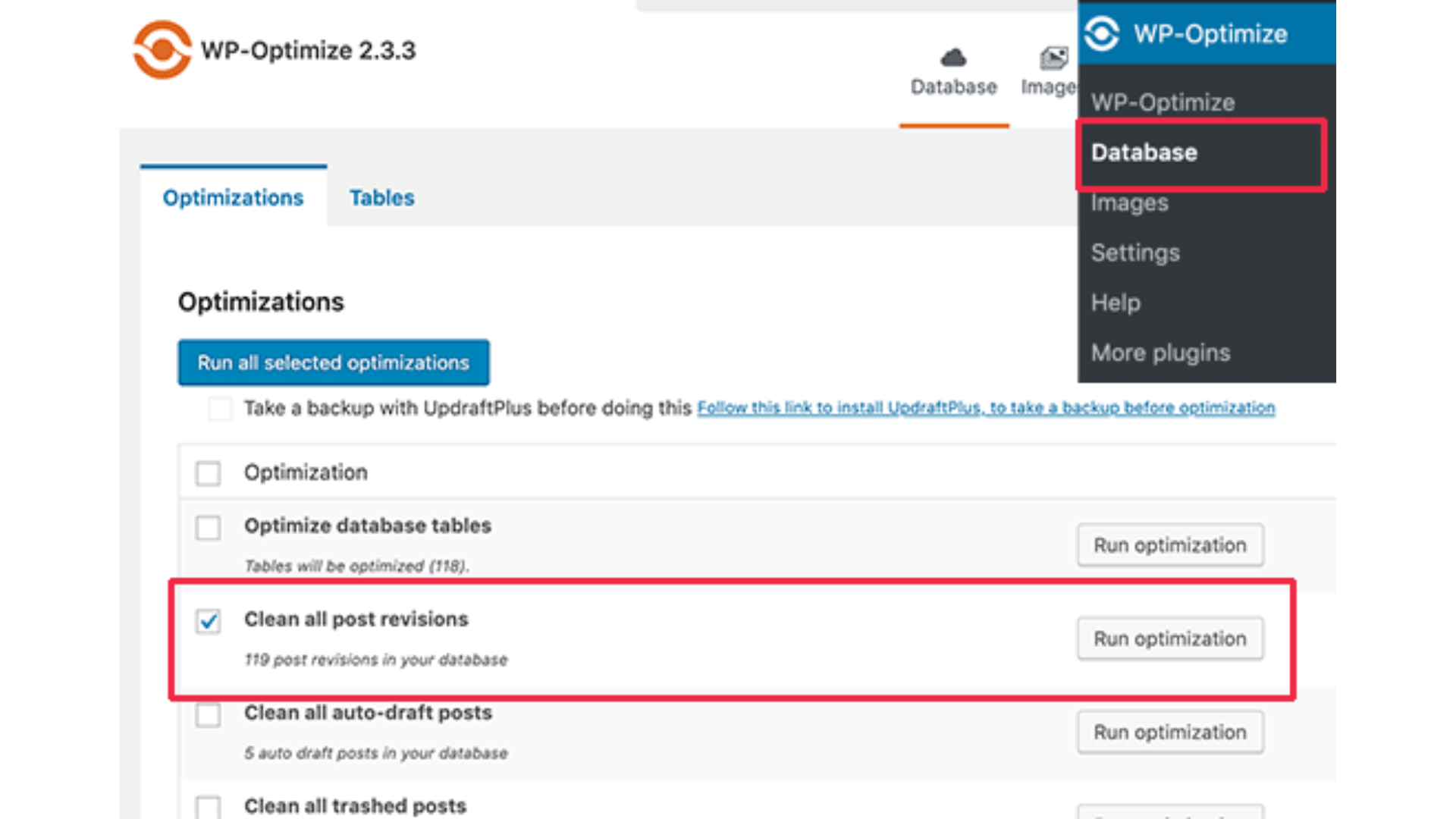
Source: https://www.wpbeginner.com/beginners-guide/complete-guide-to-wordpress-post-revisions/
There are several options for store owners to choose:
- Delete older revisions while keeping recent versions.
- Limit the creation of future revisions through WordPress configuration settings.
- Schedule periodic revisions cleanup activities.
The goal is not to eliminate version history entirely, but to ensure both the ability to recover and database efficiency.
Step 3: Purge expired sessions
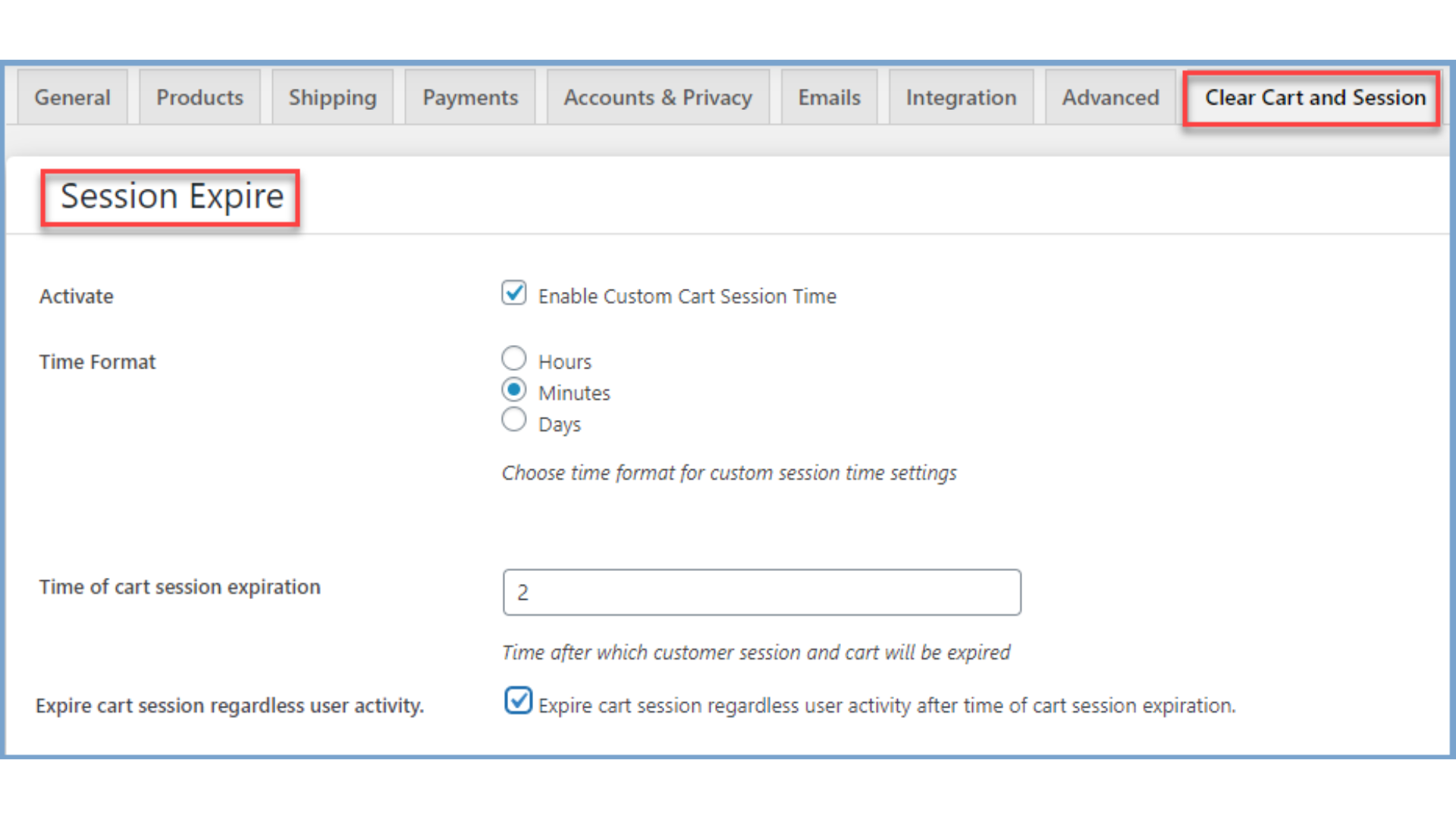
Source: https://woocommerce.com/document/clear-cart-and-sessions-for-woocommerce/
WooCommerce session tables often contain abandoned carts and expired customer sessions. Regularly removing outdated session data helps preserve active customer activity. Many modern optimization tools available provide session cleanup features that can automate this process safely.
Step 4: Review plugin-generated tables
A thorough database audit helps identify tables associated with plugins that are no longer installed. Yet this stage requires greater caution. Store owners should verify which plugins originally created each table; whether any active processes still reference the data; and whether historical information needs to be archived before removal.
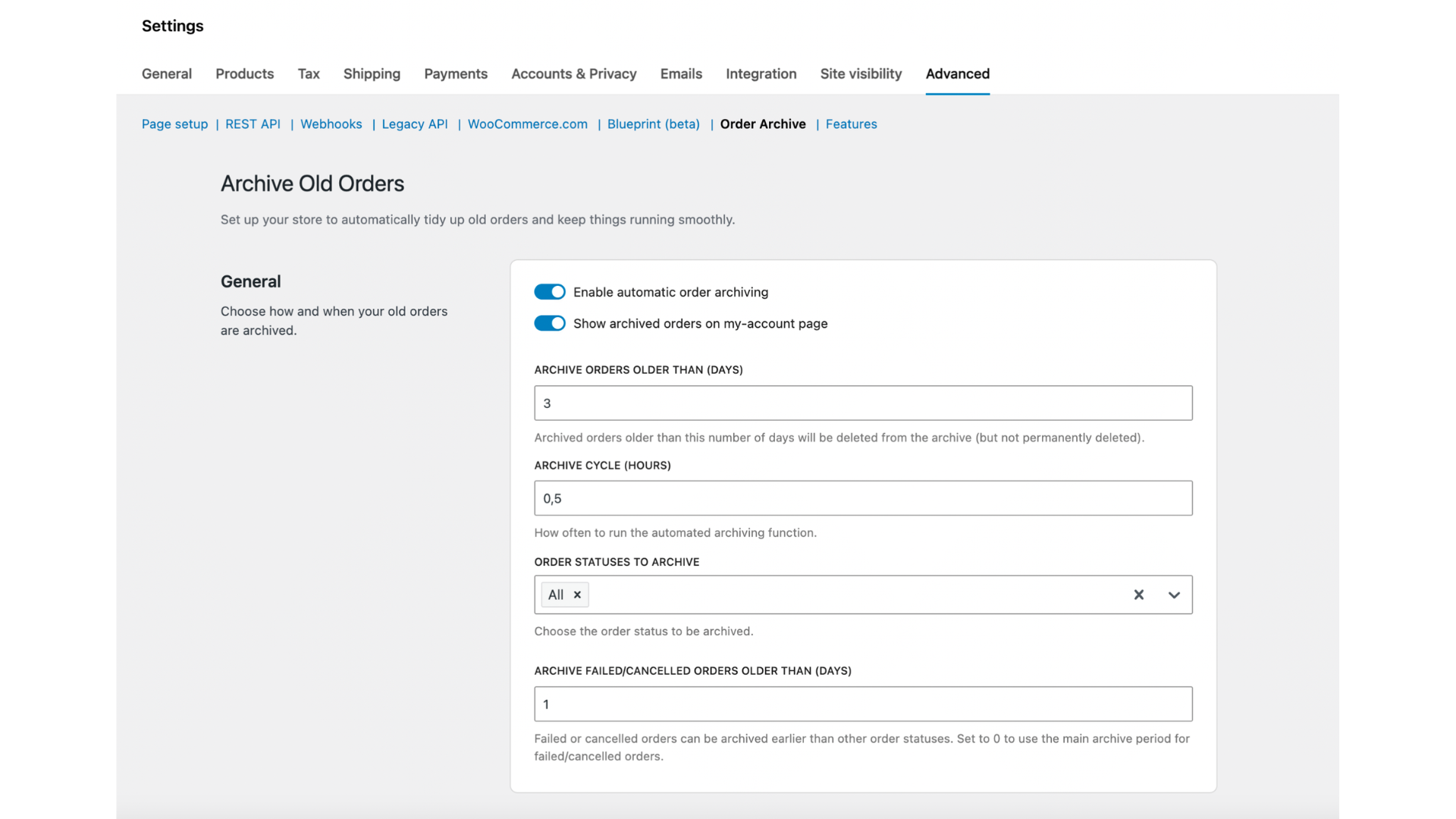
Step 5: Archive older order data
Order Data represents one of the most valuable assets within an eCommerce business. Historical orders carry legal, accounting, tax, and customer service significance. Therefore, deleting old orders is rarely advisable.
Source: https://developer.woocommerce.com/docs/best-practices/data-management/logging/
Instead, stores should consider archiving older Order Data in separate storage environments while still maintaining access for reporting and compliance. Archiving reduces the workload on active transactional databases.
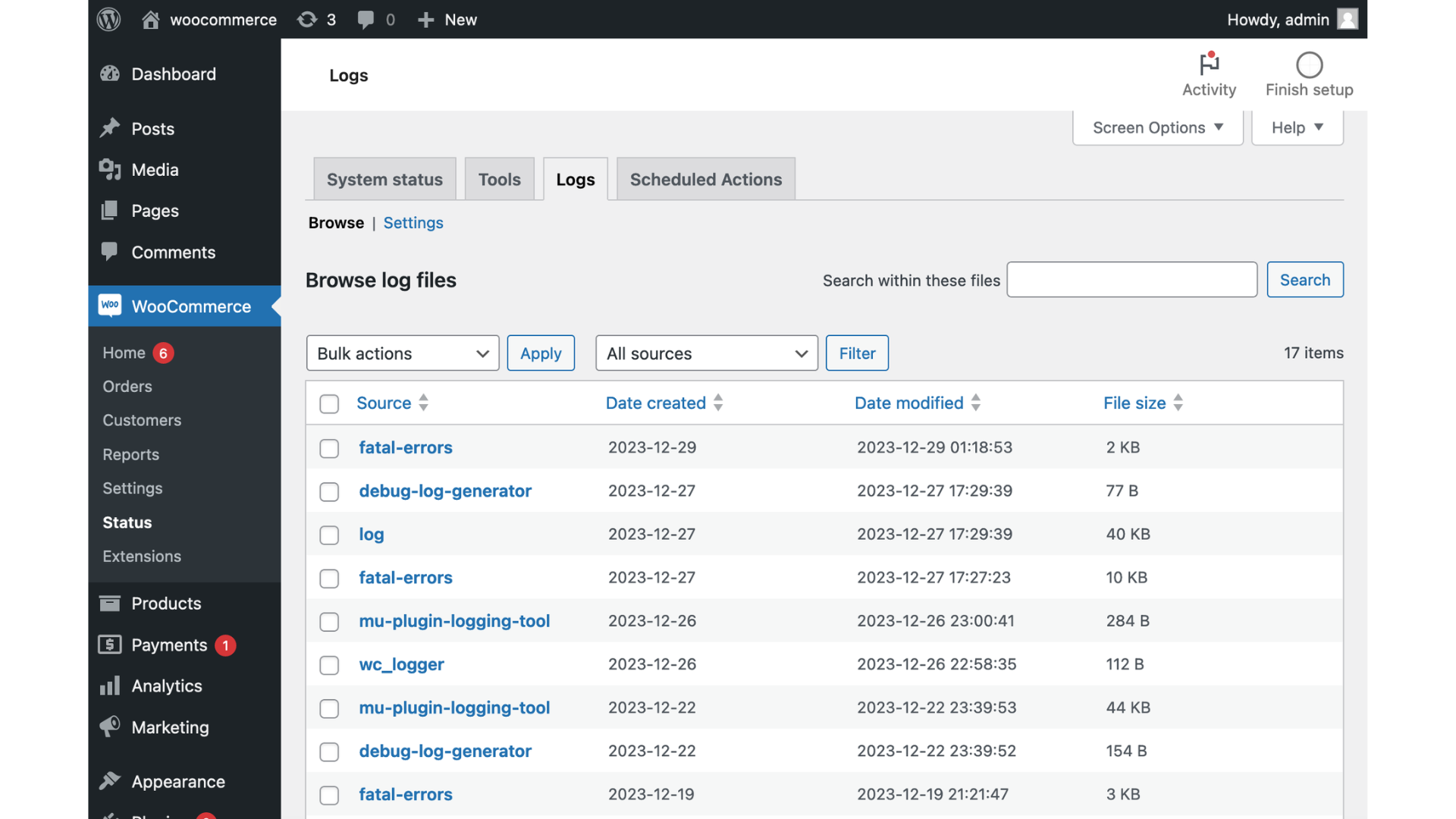
Step 6: Clean log files and debug records
Many WooCommerce extensions generate extensive logs for troubleshooting and monitoring. These old log files often have little ongoing value and can be archived or removed.
Source: https://woocommerce.com/document/archive-old-orders/
Regular log maintenance helps prevent unnecessary database expansion and improves overall organization.
Building a sustainable database maintenance strategy
Data Cleansing should not be viewed as a one-time project, as the database naturally grows with business success. As traffic increases, product catalogs expand, and customer interactions multiply, new data accumulates. Therefore, the most effective approach is to establish recurring maintenance procedures.
Monthly or quarterly database audits help identify emerging issues before they become major bottlenecks. In addition, automated cleanup schedules can help manage transients, revisions, and sessions without extensive manual intervention.
In short, database optimization should be treated as an ongoing process to maintain consistent performance and support future growth.
How Next-Cart optimizes your WooCommerce transition
Database cleanup is vital when businesses plan to upgrade the platform, redesign the store, or migrate the shopping cart. If a store decides to migrate a bloated database, transferring years of accumulated technical debt to a new platform, the migration simply relocates issues rather than solving them.
As a specialized shopping cart migration service, Next-Cart has extensive experience working with WooCommerce, Magento, Shopify, BigCommerce, WordPress, and other eCommerce platforms. We have observed how poorly maintained databases undermine performance and user experience. Our team helps merchants evaluate existing database structures, eliminate accumulated clutter, and migrate only relevant, active data to a new platform.
Experienced eCommerce specialists can help businesses preserve critical products, customers, Order Data, categories, images, and custom information. Next-Cart’s secure migration infrastructure and 24/7 technical support will help merchants navigate a smoother path toward modernization by first eliminating unnecessary database baggage.
In conclusion
A slow WooCommerce store is not always a hosting problem, but the real culprit may be an overloaded Database Schema after years of accumulated revisions, expired transients, abandoned sessions, orphaned plugin tables, and unnecessary log files. Like a warehouse filled with forgotten inventory, an unmanaged database becomes harder to navigate and can slow performance across the entire website.
Implementing a structured Data Cleansing strategy means restoring efficiency and reducing server strain, helping create a better Customer Experience, especially during checkout.
For businesses planning a platform upgrade, redesign, or migration, database optimization becomes even more important. Moving clean, organized data creates a stronger foundation for future growth.
Combining deep eCommerce expertise with professional migration services, Next-Cart helps merchants transition confidently with only valuable, active data. The result is a cleaner database, a faster store, and a smoother shopping experience.